

Introduction
Struggling to keep track of your company’s equipment, vehicles, or IT hardware? You’re not alone. Without a proper system, valuable assets can go missing or unaccounted for – leading to lost money, compliance headaches, and wasted time. Fixed asset tracking is the solution: it uses tagging technology and asset tracking software to monitor the location, status, and value of physical assets in real time. In this ultimate 2026 guide, we’ll explain what fixed asset tracking is, fixed asset tracking benefits, why it’s important, and how to implement it effectively. You’ll learn about the latest tools, best practices, and strategies to ensure every asset – from office laptops to heavy machinery – is accounted for and optimized.
In this guide, you’ll learn:
- What fixed asset tracking is and how it supports accuracy, compliance, and cost control.
- How asset tracking works in practice, including barcodes, RFID, GPS, and system integrations.
- How to implement a fixed asset tracking system step by step, from audit to rollout.
- Best practices, common challenges, and FAQs to maintain an audit-ready asset register.
What is Fixed Asset Tracking?
Fixed asset tracking is the process of monitoring and recording the status and location of a company’s physical assets throughout their lifecycle. Each asset is tagged with a unique identifier (such as a barcode, QR code, or RFID tag) and tracked using software so that organizations always know what assets they have, where each asset is, and who is using it.
Fixed asset tracking involves maintaining a centralized asset register for all long-term equipment, vehicles, and machinery. Changes in location, assignment, maintenance, or disposal are logged through scanning or manual input. This continuous process provides an accurate, real-time view of the organization’s asset inventory.
Fixed asset tracking manages long-term tangible items throughout their lifecycle—from acquisition to maintenance and retirement—ensuring accuracy, efficiency, and operational visibility. It supports financial reporting, depreciation, audits, and compliance with standards like ISO 55000, preventing assets from falling through the cracks. Modern systems replace spreadsheets and paper logs, providing a reliable foundation for strong asset management and governance
Why is Fixed Asset Tracking Important?
Fixed asset tracking is important because it prevents asset loss, saves money, and ensures accurate records for audits and compliance. By knowing exactly where each asset is and its status, organizations can avoid misplaced or stolen equipment, eliminate redundant purchases, and make maintenance and auditing much easier. In short, effective asset tracking yields both financial and operational benefits.
Here are some of the key benefits of a fixed asset tracking system:
-
Prevent Loss and Theft:
Real-time tracking means missing items are noticed quickly. Tagging valuable assets (and keeping logs of custody) deters theft and helps recover lost equipment. Employees are less likely to “lose” a tool or device when they know it’s being tracked.
-
Cost Savings:
With up-to-date asset records, companies avoid buying duplicates of assets they already own or renting equipment that’s actually sitting unused. You can also identify underutilized assets and redistribute them instead of purchasing new ones. Overall, better tracking leads to more efficient asset utilization and lower capital expenditures.
-
Improved Maintenance & Asset Life:
Tracking includes logging usage and service data. This helps schedule timely preventive maintenance, which extends asset lifespan and prevents costly breakdowns. For example, if you know exactly which machines have been used for how many hours, you can service them on schedule and avoid surprise failures.
-
Accurate Financial Reporting:
A fixed asset register that’s kept in sync with reality means your accounting books (asset values, depreciation, etc.) are accurate. During audits or asset verification exercises, you can readily show auditors that every asset on the books is accounted for. This ensures compliance with regulations like the Sarbanes-Oxley (SOX) Act and financial reporting standards (IFRS/GAAP).
-
Faster Audits & Compliance:
Asset tracking systems often have reporting tools that make audits much smoother – for instance, the system can generate an audit list and you can scan assets to verify their existence. This cuts down audit preparation time significantly. (In fact, one industry analysis found that organizations cut audit preparation time by 50% on average after implementing asset tracking software.)
-
Operational Efficiency:
Tracking assets reduces time spent searching for equipment and improves efficiency. In hospitals, tagged wheelchairs or IV pumps let staff locate units quickly, enhancing patient care. In offices or factories, employees can check the system to find shared tools or equipment instantly, avoiding delays and unnecessary effort.
-
Better Decision Making:
Asset tracking reveals usage patterns and maintenance data, guiding procurement and retirement decisions. Low-utilization assets can be sold or avoided, while high-use items may justify additional purchases. Condition and maintenance history support budgeting for replacements or upgrades.
-
Enhanced Security & Accountability:
Assigning responsibility for assets becomes easier – many systems allow you to check assets in/out to specific employees or departments. This creates accountability (everyone knows who last had the item), which in turn encourages care and proper usage. It’s also useful for compliance with security standards; for instance, in IT asset tracking, knowing exactly which devices hold sensitive data (and where they are) is vital for security audits (such as SOC 2 or ISO 27001 compliance).
Ultimately, fixed asset tracking directly impacts ROI and strengthens organizational risk management outcomes. By reducing loss, companies optimize asset usage and achieve substantial cost savings. For example, reports show organizations save 40–60% on asset-related costs after implementation. Meanwhile, improved accuracy eliminates ghost assets, avoiding penalties and unnecessary tax exposure.
How Does Fixed Asset Tracking Work?
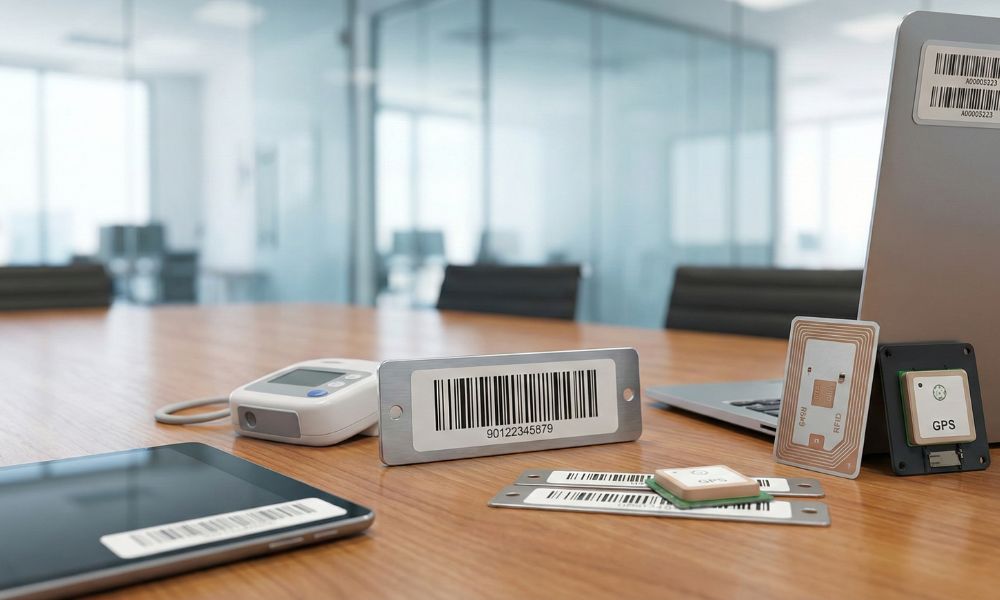
Fixed asset tracking works by tagging each asset with a unique identifier. Then, scanners or sensors log movements or changes into a central database. In practice, teams attach barcode labels or RFID tags to assets. As a result, scans update records, giving real-time visibility into asset condition.

There are a few common technologies and methods used for physical asset tracking:
-
Barcodes/QR Codes:
This barcode-based method remains the most prevalent approach for asset tracking. Each asset receives a barcode or QR code label for identification. When scanned, the code records movements, assignments, and updates in the system. However, barcodes require line-of-sight, while QR codes store more information.
-
RFID Tags:
RFID tags transmit asset information wirelessly using radio waves for identification. There are passive RFID tags without batteries and active RFID tags powered. However, RFID eliminates line-of-sight, enabling simultaneous scanning of multiple assets. Therefore, despite higher costs and interference risks, RFID suits high-volume environments.
-
GPS Trackers:
For assets traveling long distances, GPS tracking devices provide continuous location visibility. Typically, a small tracker sends real-time location data via cellular connections. As a result, organizations manage fleets and equipment using live map views. However, GPS trackers need power and subscriptions, limiting use to high-value assets.
-
BLE Beacons & IoT Sensors:
In modern setups, BLE beacons and IoT sensors track asset movement and condition. For example, BLE tags broadcast presence to nearby receivers, confirming asset proximity. Meanwhile, IoT sensors monitor conditions like temperature and humidity for sensitive equipment. However, these technologies add automation and context but require extra infrastructure.
All tagging methods feed into central asset tracking software that manages data. Essentially, the software stores asset details and updates records whenever scans occur. Moreover, modern systems are cloud-based, enabling real-time access and collaboration. For example, technicians log maintenance events instantly using mobile apps.

System Integrations in Asset Tracking
Integration plays a critical role in how asset tracking systems operate effectively across organizations. For example, linking tracking with ERP or accounting software automatically updates financial records when assets are disposed. Additionally, CMMS integration can auto-create work orders when assets reach usage thresholds. When systems integrate seamlessly, organizations reduce manual data entry, minimize errors, and improve overall operational efficiency.
Real-World Example: IT Asset Tracking in Action
A quick real-world example: Imagine a company’s IT department receives 50 new laptops. With a tracking system in place, they immediately tag each laptop with a barcode or RFID label. They use a mobile asset tracking app to scan each tag and fill in details (serial number, specs, assigned employee, etc.) as they distribute the laptops. Now, each laptop’s location (which employee has it, which office) is recorded.
If a laptop is later relocated to a different department, the staff there scans it and updates its location. If one gets sent for repairs, it’s scanned out and marked under maintenance. At year-end, when it’s time for audit, the IT team can quickly scan all laptops to verify they’re present and the system will highlight any missing ones. The tracking solution ensures nothing “vanishes” without accountability.
Choosing the Right Tracking Technology and Tools
Barcodes versus RFID and mobile versus fixed scanners each offer distinct advantages. Therefore, many organizations combine methods, using smartphones and traditional scanners. However, ease-of-use drives adoption, because intuitive mobile apps encourage regular updates. Ultimately, choose methods fitting environments and train staff to ensure consistent use.
Quick Summary for Easy Understanding
In simple terms, barcodes and RFID decide how assets are identified, while mobile and fixed scanners decide how data gets captured. Barcodes and mobile scanners rely more on people. RFID and fixed scanners rely more on automation. Most organizations combine these methods based on how assets move and how teams work.
| Decision Factor | Barcodes | RFID | Mobile vs. Fixed Scanners |
|---|---|---|---|
| Identification method | Visual scan of printed labels | Wireless detection using readers | Mobile moves with users; fixed stays at locations |
| Speed of tracking | Slower, scans happen one at a time | Faster, multiple assets scanned together | Mobile is manual; fixed is automatic |
| Asset movement fit | Low movement or periodic audits | High movement or frequent verification | Mobile fits flexible work; fixed fits controlled paths |
| Cost impact | Lower upfront cost | Higher initial investment | Mobile is cost-effective; fixed needs infrastructure |
| Operational effort | Requires consistent staff action | Reduces manual effort at scale | Mobile depends on usage; fixed enforces compliance |
| Enterprise use case | Offices, IT assets, furniture | Warehouses, data centers, large inventories | Mobile for daily ops; fixed for checkpoints |
In practice, enterprises rarely choose just one option. Instead, they combine barcodes or RFID with mobile or fixed scanners based on asset type, movement, and audit needs. Ultimately, the most effective tracking setup is the one employees use consistently, because reliable data depends on adoption.
How to Implement a Fixed Asset Tracking System
Here is a step-by-step plan to implement an asset tracking system:

Implementing a fixed asset tracking system involves a series of clear steps: start by auditing and cataloging all assets, then choose the right technology and software, tag every asset, and train your team on the new process.
-
Perform an initial asset audit (inventory):
Begin with a comprehensive physical audit across all locations, including offices, warehouses, and facilities. Next, systematically record each asset’s description, model, serial number, location, department, purchase date, cost, and condition. Involve IT, finance, and facilities teams to ensure nothing is missed, and then reconcile findings with the accounting ledger to identify discrepancies.
-
Choose the tracking technology (barcodes vs. RFID, etc.):
Decide on an asset identification method that aligns with your organization’s needs and scale. Barcode or QR code labels remain cost-effective for most office and facility assets, while RFID tags support faster scanning and higher automation for large inventories. Consider environmental factors, including durability requirements and long-range scanning, to select the most reliable tags. Some enterprises adopt a hybrid approach, combining RFID for warehouses and barcodes for offices, with GPS trackers for field equipment when necessary.
-
Select suitable asset tracking software:
Selecting the right software is critical, as it forms your system’s operational backbone. Evaluate solutions based on organization size, usability, and essential features, including reporting, maintenance tracking, and integration capabilities. Ensure compatibility with your chosen tagging technology, such as RFID readers or QR code scanners, and verify mobile access for on-the-go asset management. Plan for seamless integration with ERP or accounting systems to synchronize asset data, balancing functionality, cost, and scalability for long-term efficiency.
-
Tag all assets:
After selecting your technology and software, physically label every asset in your inventory consistently. Print barcode labels or program RFID tags, placing them in easy-to-scan locations for reliability and efficiency. Use specialized tags for small or irregularly shaped assets, ensuring durability and proper attachment. As you tag, scan each asset into the system, importing audit spreadsheets and verifying or updating records to maintain accuracy.
-
Populate and verify asset data:
If not done during tagging, enter all asset details into the software accurately. Categorize by type, department, purchase cost, warranty, and maintenance schedules. Use bulk imports to streamline data from audit spreadsheets efficiently. Run reports and spot-checks to confirm records accurately reflect your organization’s assets.
-
Define processes and policies:
Technology alone cannot ensure effective asset management without clear procedures and accountability. Create a policy outlining tagging, location updates, audits, and asset disposal processes. Assign department-level asset managers to maintain responsibility and ensure compliance. Endorse the policy through management so employees understand maintaining accurate records is mandatory, not optional.
-
Train the team and roll out:
Even the best system fails without proper user training and engagement. Conduct hands-on sessions for all employees who interact with scanners, mobile apps, or asset records. Emphasize both personal benefits, like efficiency, and organizational gains, such as cost savings and audit readiness. Provide guides, pilot deployments, and company-wide communication to ensure adoption and smooth rollout.
-
Go live and enforce usage:
After training, officially launch the asset tracking system and tag all new assets immediately. Record every asset movement, while project teams monitor transactions closely during the initial period. Provide gentle reminders and support to ensure compliance, reinforcing proper usage habits. Highlight early wins, such as cost savings or faster audits, to encourage continued adoption.
-
Schedule regular audits and reconciliations:
Even with ongoing tracking, schedule periodic asset audits, typically at least annually. Physically scan all assets to verify they match the system’s digital records. Use software-generated exception reports to identify missing, unrecorded, or misplaced items, reconciling discrepancies to improve accuracy. Regular audits maintain compliance, accountability, and consistency, and checklists help standardize the process from planning through documentation.
Following these steps ensures a robust fixed asset tracking system tailored to your organization. Implementation is the start of a new, continuous approach to managing assets effectively. Refine the system over time by adding features, integrating additional data, or adjusting policies based on feedback. Encourage users to report issues and suggestions so the system becomes a trusted, daily workflow tool rather than a burden.
What Features Should a Fixed Asset Tracking System Have?
A good fixed asset tracking system (software) should offer features like easy asset tagging and scanning, a centralized asset database, check-in/check-out capability, maintenance and depreciation tracking, audit-friendly reporting, and integration with your other business systems. It’s also important that the software has strong security controls (to protect your data) and is user-friendly so staff will actually use it consistently.
When evaluating fixed asset tracking software features, look for the following key capabilities:
-
Centralized Asset Database:
-
Barcode and RFID Support:
The system must support your chosen tagging method seamlessly, whether barcodes, QR codes, or RFID. It should generate printable labels, integrate with scanners or mobile apps, and bulk-import RFID scans efficiently. Hybrid setups must be accommodated, allowing different assets to use different tags. Real-time capture and matching of scans to asset records ensures accurate and up-to-date tracking.
-
Mobile Access & App:
-
Check-In/Check-Out Functionality:
-
Maintenance Tracking:
-
Depreciation & Financials:
For finance purposes, the system should track purchase price, book value, and depreciation for each asset. This enables reports on total depreciation, fully depreciated assets, and supports tax or insurance calculations. Some tools automatically calculate depreciation using methods like straight-line or MACRS once parameters are entered. Integrating financial data improves visibility and simplifies accounting for asset management teams.
-
Audit Trails & Reporting:
The system must maintain a full audit trail, recording who made changes, when, and what was modified. Generate reports on inventory by location, disposals, maintenance, or audit discrepancies to improve oversight. Dashboards displaying metrics like total assets, value, and dormant items enhance visibility. These features simplify management and provide clear data for leadership and auditors.
-
Integration Capabilities:
Integration is critical, so the system should offer APIs or built-in connectors with key enterprise software. Sync with ERP or accounting systems to automatically import new assets and prevent omissions. Connect procurement, IT asset management, or service desk tools to link purchase orders and helpdesk tickets efficiently. Evaluate vendors’ integration options, including REST APIs, Zapier, or pre-built connectors for platforms like SAP, Oracle, or Microsoft Dynamics.
-
User Permissions and Security:
Enterprise asset data can be sensitive, so the system should support role-based access control. Define who can view or edit financial, IT, or general asset information to maintain security and accountability. Ensure secure authentication, ideally with single sign-on, and verify the vendor follows strong cloud security practices. Trust signals like SOC 2 or ISO 27001 compliance demonstrate adherence to high data protection standards.
-
Alerts & Notifications:
Some systems can send emails or notifications for certain events – like if an asset hasn’t been scanned in X days (might indicate it’s missing), or when an asset’s warranty or lease is about to expire, or if a scheduled audit is upcoming. These proactive alerts help you stay on top of asset management tasks without constantly checking the system manually.
-
Scalability and Customization:
Consider future needs – if you plan to grow or add different asset types, can the software scale easily (both in terms of number of assets and flexibility)? It’s useful if you can customize fields or categories to match your industry (e.g., a healthcare company might want to label assets by patient-care vs non-patient-care equipment, or a manufacturer might track machine uptime). A system that lets you add custom fields or adjust workflows can adapt as your requirements evolve.
choose a full-featured asset tracking system that centralizes location and asset information. Consequently, it delivers value across departments—from operations tracking items, to finance assessing value, to IT and security ensuring assets are accounted for and protected.
Before finalizing your software choice, it can be helpful to check for reviews or case studies, and even request a trial. Make sure the interface is intuitive, because a complicated system that employees find hard to use will struggle to gain adoption. The goal is to have a tool that people willingly turn to whenever they need information or need to update something about an asset.
Fixed Asset Tracking Best Practices
Best practices for fixed asset tracking include establishing clear procedures, keeping asset data current in real time, performing regular audits, and leveraging automation where possible. In short, treat asset tracking as an ongoing discipline rather than a one-time project. Below are several proven practices and tips to get the most out of your tracking system:
-
Establish a Formal Policy and Assign Ownership:
Create a written asset management policy detailing how assets are added, transferred, and disposed. Clearly assign responsibility, such as department custodians maintaining accurate records. Consequently, defined rules and accountability standardize the process and ensure reliable tracking.
-
Tag & Record New Assets Immediately:
Make it a rule that all new assets are tagged and entered into the system before deployment. This prevents items from slipping through unrecorded. For example, IT should barcode and record new laptops before distributing them to employees. Prompt tagging ensures a complete and accurate inventory from the start.
-
Keep Asset Data Up-to-Date (Real-Time Updates):
Ensure asset status and location updates occur in near real time by providing scanners or mobile app access. Encourage staff to scan or notify managers immediately when moving assets. Consequently, records accurately reflect reality, reducing errors caused by delayed updates.
-
Conduct Regular Audits and Reconciliations:
Schedule periodic physical audits to verify system accuracy, typically annually or quarterly. These checks identify discrepancies, missing items, or “ghost assets” that exist only in records. Investigate issues promptly, updating records or taking corrective action to maintain data integrity. Regular audits support compliance, reduce financial risk, and prevent overpaying taxes or insurance on nonexistent assets.
-
Use Durable, Appropriate Tags:
Choosing the right asset tags is critical for durability and visibility in various environments. Use industrial-grade or RFID tags for harsh conditions and tamper-evident tags for high-value items. Discreet or branded tags suit assets where appearance matters, while ensuring scannability throughout their lifecycle. Regularly maintain tags, replacing any that become damaged or illegible to preserve accurate tracking.
-
Leverage Automation and Integration:
Leverage system features to automate routine tracking and minimize manual effort. First, set reminders for custodians and alerts for unscanned or missing assets. Next, integrate purchase workflows to flag new assets automatically. Finally, use creative integrations, like badge access systems, to embed tracking into daily operations.
-
Train and Motivate Employees:
Continuous training and reinforcement ensure employees follow asset tracking procedures consistently. Include onboarding for relevant roles and provide annual refreshers or updates when processes change. Explain the purpose and impact of tracking, sharing success stories to motivate compliance. Reinforce accountability through management support or recognition programs to maintain accurate asset records.
-
Implement Checkpoints and Reviews:
In addition to annual audits, implement interim checks. For example, managers can review team assets biannually, or IT can spot-check items inactive for six months. Consequently, issues are caught early. Treat asset management as a continuous, improving process rather than a one-time task.
-
Backup and Secure Your Data:
Regularly back up asset tracking data to protect against loss or corruption. Verify cloud vendors perform routine backups, or coordinate on-premise backups with IT. Control access so only authorized users can modify records, limiting view permissions for sensitive assets. These measures preserve data integrity and prevent accidental or malicious changes.
Following these best practices maintains accuracy and delivers growing value over time. Consequently, tracking trends helps identify frequently misplaced assets and improve controls. Additionally, integrating with other departments can close gaps and further optimize the program.
Remember, consistency is key. A fancy system used inconsistently will yield poor results, whereas even a basic system used diligently can greatly improve asset management. So, embed these practices into your organizational culture. When done right, fixed asset tracking becomes second nature in daily operations, and the payoffs – financial savings, smoother audits, and peace of mind – become very tangible.
Download our free Fixed Asset Audit Checklist (PDF) –
Common Challenges in Fixed Asset Tracking
Common fixed asset tracking challenges include incomplete data, missing tags, employee noncompliance, and poor system integration. Organizations often struggle to log every asset accurately and ensure consistent staff adherence. Identifying these issues early enables proactive mitigation and more reliable tracking.
-
Incomplete or Inaccurate Initial Data:
If the initial inventory misses assets or records errors, they propagate into the system. For example, overlooked tools remain untagged. As a result, you risk a false sense of security, assuming all items are tracked while some remain unaccounted for.
Mitigation: Conduct a thorough initial inventory, cross-referencing accounting, insurance, and departmental records. Use two teams to double-check critical areas for accuracy. After implementation, perform a follow-up audit to identify any assets that were initially missed. This ensures the system starts with a complete and reliable dataset.
-
Employee Non-Compliance:
One of the biggest hurdles is getting everyone to consistently use the new system. Busy employees might forget to scan an asset when they move it, or they might not see the value in the extra step. Over time, these small lapses create holes in your data (e.g., an asset shows in the system at Location A, but it’s actually sitting in Location B because someone moved it and didn’t update the record).
Mitigation: Reinforce system usage through training and culture, making it easy with sufficient scanners or a reliable app. Link compliance to performance metrics or departmental audit scores to encourage accountability. Address non-compliance promptly, using champions to influence teams positively. Regular internal communications keep asset tracking visible and top-of-mind across the organization.
-
Lost, Damaged, or Unreadable Tags:
Asset tags can wear, fall off, or become unreadable, causing assets to be missed or misreported. Missing or damaged tags prevent scanning and status updates, leading to inaccurate inventory records.
Mitigation: Regularly inspect asset tags, especially on frequently used or moved items, and keep spares available. Re-tag damaged assets immediately during audits to maintain accuracy. Use high-quality labels and proper attachment techniques to reduce failures. For RFID, ensure correct placement and test read ranges to avoid interference or unreadable tags.
-
Integration Gaps (Data Silos):
Without integration, asset data can quickly fall out of sync with purchasing or accounting systems. Disposals or new purchases may not be reflected, creating ghost assets or untracked items. Ensuring system integration prevents these gaps and maintains accurate, up-to-date records.
Mitigation: Establish a cross-department workflow to ensure all asset changes are communicated consistently. Use manual triggers if integration isn’t complete, such as notifying coordinators on addition or disposal forms. Reconcile tracking data with accounting quarterly to identify discrepancies. Even basic integrations, like shared spreadsheets or automated alerts, help close the loop and maintain accurate records.
-
Scalability and Performance:
As the number of assets grows, some systems might become slower or harder to manage, and the volume of data can overwhelm your processes. For example, scanning 10,000 assets during an audit can be a daunting task if done all at once, or the system’s reports might take longer to run with huge datasets.
Mitigation: Plan asset tracking in manageable segments, breaking audits into cycles for large inventories. Use system filters to prioritize high-value or frequently used assets. Ensure software can handle your organization’s scale, and verify IT infrastructure supports self-hosted solutions. Archive disposed assets to maintain a lean, efficient active dataset.
-
User Resistance and Change Management:
Beyond simple oversight, employees may resist a new system due to habit or misunderstanding. For example, some rely on spreadsheets or fear asset tracking monitors them personally. Moreover, without leadership support, policies may go unenforced, reducing adoption and compliance.
Mitigation: Engage end-users early by involving them in system selection or process design for practical feedback. Emphasize that the system improves efficiency and accountability, not policing. Ensure management leads by example, using reports and valuing accurate data. Highlight success stories and quick wins to demonstrate tangible benefits and encourage adoption.
-
Technical Issues and Downtime:
Like any IT system, an asset tracking solution can have technical hiccups – server downtime, software bugs, scanner hardware failures, etc. If the system is down and people can’t scan, they might develop a backlog or lose trust in it.
Mitigation: Maintain a backup plan for capturing asset data if the system is temporarily unavailable. Coordinate with IT or the vendor to ensure high availability and clear support contacts. Keep scanners charged, functional, and test them regularly with sample assets. Consider redundancy, such as extra devices or server backups, to prevent disruptions in critical operations.
Addressing challenges is part of continuous improvement in asset management. Initial setbacks are common, but identifying root causes and adjusting processes ensures progress. As data quality improves and users adapt, issues naturally decline over time. After sustained use, organizations build trust in the system, enabling better decisions and smoother operations.
Lastly, remember that technology is an aid, not a substitute for management. Regular oversight, whether it’s reviewing exception reports or spot-checking an area, will always be needed. By combining good technology with good management practices, you create a resilient asset tracking program that can withstand these challenges.
Key Takeaways- Fixed Asset Tracking
- Overall, fixed asset tracking enables organizations to monitor asset location, usage, and condition throughout the lifecycle, helping reduce loss, improve utilization, and support accurate financial reporting.
- By combining the right technologies—such as barcodes, RFID, GPS, and integrated software—with structured processes, businesses streamline audits, strengthen compliance, and eliminate data gaps across finance, IT, and operations.
- Finally, consistent scanning, regular audits, and system integrations turn asset tracking into a continuous practice, ensuring long-term efficiency, scalability, and measurable ROI.
Conclusion
A good fixed asset tracking system simplifies life for finance, IT, and operations, providing cross-departmental visibility. It supports better decisions, from retiring old equipment to justifying new purchases based on usage data. Fixed asset tracking is part of a broader asset management ecosystem, and exploring specialized software, tracking technologies, and industry-specific best practices can further optimize your processes.
Treat asset information with the same care as financial data to ensure enterprise-wide accountability. Simple tools like scanners and barcodes transform management from chaos into a transparent, efficient process. Follow these steps, adapt them to your organization, and eliminate asset-related headaches. Accurate tracking benefits audits, financial reporting, and anyone searching for critical items.

Fixed Asset Tracking FAQ
Q1: Can I track fixed assets in Excel or manually?
Ans: Excel or manual logs work for small asset pools but scale poorly and are error-prone. Spreadsheets require constant updates and quickly become outdated. Dedicated fixed asset tracking software automates scanning, reporting, and tracking, providing greater accuracy and efficiency for growing organizations.
Q2: What is an asset tag?
Ans: An asset tag is a label attached to an item that contains a unique identifier for that asset. It could be a printed barcode/QR code or an electronic RFID tag. When you scan or read the asset tag, it pulls up that asset’s information in the tracking system. Asset tags are the primary way to link physical objects to their digital records.
Q3: Should we use RFID or barcodes for asset tracking?
Ans: Choose barcodes for a cost-effective, line-of-sight scanning solution, ideal for smaller volumes. Use RFID for faster, bulk scanning without direct line-of-sight, suitable for high-volume inventories. Many businesses start with barcodes and adopt RFID selectively where speed is essential.
Q4: How often should we conduct asset audits?
Ans: Conduct asset audits at least once a year to ensure your physical assets match the records in your system. Annual audits strike a good balance for most companies. However, if you operate in a fast-changing environment or have very valuable assets, you might do audits more frequently (for example, quarterly or semi-annually) to catch discrepancies early.
Q5: What is ISO 55000 in asset management?
Ans: ISO 55000 sets international best practices for managing assets throughout their lifecycle. It emphasizes tracking, maintenance, and risk management processes to ensure assets deliver value and remain properly accounted for. Aligning with ISO 55000 improves asset management maturity and organizational credibility.
Q6: What are “ghost assets”?
Ans: Ghost assets are items recorded in your asset register but no longer exist or are in use. They often arise from poor tracking, such as failing to log disposals, and can cause incorrect financials or unnecessary insurance costs. Regular audits and consistent tracking eliminate ghost assets and maintain accurate records.
Q7: How is asset tracking different from inventory tracking?
Ans: Asset tracking manages long-term company property like equipment, vehicles, and computers, monitoring usage and maintenance throughout their lifespan. Inventory tracking monitors short-term stock, raw materials, or supplies, focusing on quantity and turnover. While both track items, asset tracking emphasizes utilization and lifecycle, whereas inventory tracking emphasizes stock levels and flow.