



What Is Data Sanitization?
Data sanitization completely and irreversibly destroys data on a device or storage medium. As a result, no one can recover the data. Unlike standard delete or format actions, sanitization removes the data itself. In contrast, basic actions only remove file references. Organizations apply sanitization when they reassign assets or transfer devices.
They also use it when they return leased equipment or retire hardware through ITAD. Before any device leaves control, teams must sanitize it, especially before processes like fixed asset disposal, where assets are permanently removed from use. This includes laptops, desktops, servers, mobile phones, USB drives, and solid-state drives.
TL;DR
Data sanitization permanently and verifiably removes data from a storage device, making it unrecoverable using standard and advanced recovery techniques. As a result, it is a critical process within hardware asset management, and organizations should treat it as a mandatory step in any responsible IT asset retirement process and an essential requirement for meeting data protection and compliance obligations.
Why Data Sanitization Matters
Organizations that fail to sanitize data-bearing devices before disposal or reassignment face serious exposure. A device that leaves the organization with recoverable data can result in regulatory penalties under GDPR, India’s DPDP Act, HIPAA, or other applicable frameworks. Beyond legal risk, unsanitized devices expose sensitive customer records, employee PII, financial data, or intellectual property to whoever gains access to the hardware.
For enterprises cycling through hundreds of laptops or servers per year, even a small percentage of improperly handled devices represents meaningful breach risk. Data sanitization is not an IT housekeeping task; it is a control that directly protects the organization’s legal standing and reputation.
How Data Sanitization Works
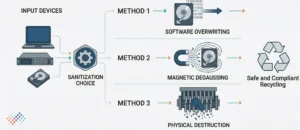
Three primary sanitization methods are used in enterprise environments, each suited to different device types and data sensitivity levels:
- Overwriting (logical erasure): Software tools write new data patterns across all storage sectors, rendering original data unreadable. NIST Special Publication 800-88 provides the widely adopted standard for this approach. Suitable for functioning hard drives and some SSDs.
- Degaussing: A powerful magnetic field disrupts the magnetic storage on spinning hard drives or magnetic tape, destroying stored data. Effective for HDDs and tape media, but renders the device non-functional afterwards.
- Physical destruction: The storage media is shredded, crushed, or disintegrated to the point where no usable data can be extracted. Used for devices that cannot be sanitized by software or when the data classification level demands absolute certainty.
The choice of method depends on the device type, the data classification of content stored, and whether the device will be remarketed, recycled, or destroyed. Organizations should define sanitization standards per asset class in their ITAD policy.
Best Practices for Data Sanitization
- Apply the right method to the right media. Software overwriting may not be sufficient for SSDs with wear-levelling firmware. Use physical destruction or certified cryptographic erasure for high-risk devices.
- Obtain a certificate of data destruction for every sanitized device. This document is your audit defence and regulatory evidence; keep it linked to the asset’s disposal record.
- Never rely on a factory reset for enterprise-grade sanitization. Consumer-grade resets do not meet NIST 800-88 or equivalent standards and leave data recoverable.
- Train IT and procurement staff on sanitization requirements. Devices handed off informally without logging or a formal ITAD step are the most common source of avoidable data exposure.
How AssetCues Helps with Data Sanitization
AssetCues supports secure IT asset retirement by providing a structured workflow that records sanitization status, certificate references, and disposal documentation against each asset. As a result, when teams flag assets for HOTO or disposal, they can verify that sanitization is complete before releasing the device from inventory.