


Introduction
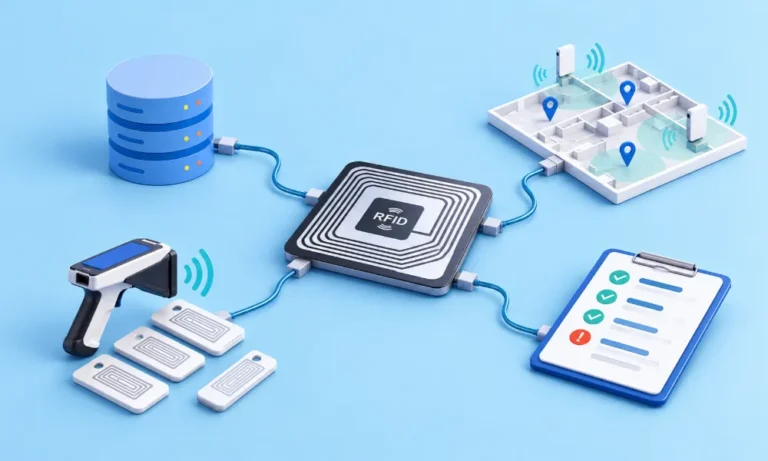
RFID asset tracking implementation is the work of building an RFID tracking system that turns tag reads into reliable, reviewed asset records. It means agreeing on the source-of-truth fields, surveying sites, commissioning tags, accepting read zones, and testing failure cases in a pilot. Exceptions then go to reviewers, the integration handoff is confirmed, and named owners take over under change control.
This guide is for IT architects, finance systems teams, and RFID programme managers who have already chosen RFID and now need to deploy it.
In this guide, you will learn:
- What an RFID implementation requires, from defining use cases and source-of-truth fields to site surveys, tag commissioning, read-zone acceptance, and rollout.
- How to design and validate RFID read zones using repeatable tests that measure missed reads, stray reads, duplicates, and workflow outcomes.
- How to test implementation failures, classify exceptions, and route approved changes while separating RFID observations from asset-record decisions.
- How to manage integrations, recovery controls, rollout gates, operational ownership, and change-triggered retesting after go-live.
Where does an RFID asset tracking implementation start?
An RFID asset tracking implementation starts with the business event the system must prove and the data it will check reads against, not with hardware. To build or set up an RFID tracking system for enterprise assets, treat it as an operating process with owners, records, and tests rather than an electronics project. The work runs in this order:

- Define the use case: the asset classes, sites, and the event each read must prove.
- Agree the source-of-truth fields and which system owns each one.
- Clean the source records and resolve uncertain ones before tagging.
- Survey each site: rooms, doors, racks, metal and liquids, power and network points, and other radio sources.
- Qualify tags, then commission each one to a verified record and check it after it is applied.
- Install and configure readers, event rules, and software workflows: roles, location hierarchy, exception codes, and approvals.
- Accept each read zone with recorded, repeated tests.
- Run the pilot as a failure test against a known scope, not as a demonstration.
- Route exceptions to reviewers and confirm the integration handoff before any record changes.
- Roll out through gates and hand the system to named owners under change control.
Agree source-of-truth fields, roles, and systems
Compare every RFID event against the expected asset location, custodian, and status. If any field is wrong, RFID exposes the error faster rather than correcting it. Define which system owns each field, who maintains it, and which events can change it.
Source-of-truth fields to agree before tagging
Field | Usual owning system | Why RFID depends on it | Check before tagging |
|---|---|---|---|
| Asset ID and tag ID link | Asset system of record | Proves which record a read belongs to | One tag per asset unless dual tagging is a design rule |
| Description, class and serial number | ERP or asset system; ITSM or CMDB for IT assets | Lets field users confirm the physical item and drives tag choice | Naming standard applied; serials checked against source documents |
| Location hierarchy | Asset system of record | Defines the expected location a read is compared with | Site, building, floor, room and zone names standardised |
| Custodian or cost centre | HRMS for people; ERP for cost centres | Supports accountability and issue and return | Leavers and moved staff updated |
| Status | Asset system of record | Stops retired or inactive items from appearing as missing | Active, in transit and retired items marked |
| Financial reference | ERP | Allows approved changes to reach the financial record | Mapping confirmed for every tagged asset |
Survey the site and commission the tags
A site survey records what the radio environment will encounter: rooms, doors and racks, metal and liquids, power and network points, and other equipment working in nearby bands. NIST’s guidance on securing RFID systems (SP 800-98, 2007) states that finding potential sources of radio interference for an implementation requires a site survey.
Permitted RFID frequencies and reader settings also differ by country. Confirm that each reader model is approved for every country where it will be installed before ordering. Re-qualify tags if the pilot ran in a different band, since a tag can perform differently from one band to another.
Commissioning links each tag to one verified asset record. Decide whether tags are encoded on site or arrive pre-serialised, and read every tag once it is applied to confirm the link. Quarantine and log spoiled or unused tags so they cannot reappear as unknown reads. Existing asset numbers can usually stay as they are; the tag ID is linked to them. Tag choice and replacement follow from earlier RFID tagging decisions.
How do you design and accept RFID read zones on site?
Design each read zone around the workflow it serves, then accept it only after recorded, repeated tests on site with real assets, real users, and normal working speed. A read zone is the space in which a reader is meant to detect tags. The goal is controlled coverage, not maximum range, because a zone that reads too far creates false events.
Choose the reader setup for each workflow
Reader setups and what each can prove
Reader setup | Fits | What a read proves | Watch for |
|---|---|---|---|
| Handheld reader or sled | Counts, store-room checks, searches | Presence along the scan path at scan time | Results vary with user technique, stacking and distance |
| Door or portal reader | Movement through a controlled boundary | Passage, if direction is designed and tested | Stray reads from items parked near the door |
| Shelf or cabinet reader | High-value spares, kits, secure storage | Presence inside the enclosure | Adjacent shelves and metal reducing reliability |
| Fixed zone reader | Staging areas, workshops, cells | Presence in a zone, not exact position | Zone overlap with neighbouring areas |
| RFID with barcode or QR fallback | Mixed surfaces and asset values | Bulk detection plus direct confirmation | Users unsure which method applies |
Fixed installations need the most care, because once a reader is mounted, its zone is shaped by antenna direction, power and the physical layout around it. Ask before installing whether the reader should detect every tag in a room or only tags crossing a boundary, and what users should do when a tag does not read.
Run a read-zone acceptance test
A read-zone acceptance test checks two things at once: that tagged assets inside the zone are read, and that tagged assets just outside it are not. Run it as a repeatable procedure so a later retest compares like with like:
- Record the setup: Reader and antenna positions, power, firmware and configuration version, tag model and batch, placement rule, and the scan path or movement speed.
- Note the site conditions: Occupancy, doors open or shut, and any stock or equipment near the zone, with a layout sketch or photo.
- Place a known set of tagged assets: Position one set inside the zone and another just outside it.
- Run the normal workflow: At normal speed, with the people who will use it, over several runs.
- Log the raw observations: Tags read inside, tags missed inside, stray reads from outside, and duplicate events shown to users.
- Compare outcomes: Check whether the system’s result matches the expected result.
- Change one variable at a time: Retest each change and repeat the accepted configuration across several runs to confirm stability.
Read share is the number of tagged assets read inside the zone divided by the number placed there, counted across all runs. It is one input to the decision, alongside stray reads, duplicate events, and whether the workflow outcome matched what you expected.
What goes into a read-zone acceptance record?
A read-zone acceptance record is the evidence that a zone was tested and accepted under stated conditions. It should let someone else repeat the test months later and get a comparable result. The acceptance limits are set by your RFID solution engineer for each workflow, not copied from a brochure.
Fields in a read-zone acceptance record
Part of the record | What to capture |
|---|---|
| Test setup | Zone ID, workflow, reader and antenna layout, power, firmware and configuration version, tag model and batch, placement rule, movement speed or scan path, number of runs, test date |
| Site conditions | Occupancy, door state, nearby stock or equipment, layout sketch or photo reference |
| Raw observations | Tagged assets inside and outside the zone, reads inside, misses inside, stray reads from outside, duplicate events |
| Expected and actual outcome | The events the workflow should create, the events it actually created, and whether they match |
| Unresolved defect | Anything still wrong after tuning, with an owner and a retest date |
| Decision | Accept, retest or redesign, with the reviewer’s name |
What should an RFID pilot failure-test plan include?
An RFID pilot failure-test plan lists the ways the system can mislead users and tests each one on purpose. The pilot is not there to prove that RFID can read tags; it is there to prove that your zones, rules and people handle bad reads correctly. Run every test in normal working conditions, and keep the evidence.
Start the pilot in evidence-only mode, where reads create events and exceptions but do not update the system of record. Measure it against a known population, meaning a set of assets whose presence and location you have confirmed by hand, and against the time the current method takes. Move to approved updates only once the failure tests pass and the exception rules are stable.
Ghost, duplicate and missed reads
A stray read, or cross-read, is a genuine read of a tag outside the intended zone, such as an item parked near a portal or one behind a partition. A ghost read is an identifier that matches no tag present, usually caused by radio noise. A duplicate read is the same tag seen many times in a short window. A missed read is a tag in the zone that the reader did not see.
Each failure needs a different response. Stray reads are reduced through zone design and event rules, while ghost reads are rejected by checking every read against the list of commissioned tag IDs. Duplicates are filtered into one event per pass. A missed read is an exception to review, not automatic proof that the asset has gone, so the workflow should route it to a person and allow a barcode or QR scan as fallback.
Directional ambiguity and connectivity loss
A door reader that cannot tell in from out will record a return as a departure. Reliable direction normally needs two read points, one on each side of the boundary, and rules on which one sees the tag first. Test it by walking tagged assets through both ways, slowly and quickly, and by pausing in the doorway. Where direction cannot be designed reliably, record passage only. RFID shows presence in a zone rather than a precise position, and that boundary defines what RFID location tracking can promise.
Connectivity loss is the failure pilots most often skip. Test what happens when a fixed reader goes offline or restarts, when the network drops during a portal event, and when a handheld finishes a count without a connection. Check whether reads are held and sent later with their original timestamps, whether device clocks are synchronised, how long a reader can buffer reads before data is lost, and whether reconnection creates duplicates.
Pilot failure-test plan
Failure | How to induce it | Correct handling to look for | Evidence to keep |
|---|---|---|---|
| Stray read | Park tagged assets just outside the zone | No event, or an event flagged for review | Stray reads per run, with the layout |
| Ghost read | Review all reads during the pilot against commissioned tag IDs | Unknown IDs rejected and logged | Count of unknown IDs and their source |
| Duplicate read | Hold a tagged asset in the zone | One event per pass | Events created per pass |
| Missed read | Carry tags against the body or in a bag; run a dense cart; repeat at forklift speed | Exception routed to a person; fallback scan possible | Misses and how each was closed |
| Wrong direction | Walk assets through both ways and pause in the zone | Correct direction, or passage flagged as uncertain | Direction outcome per pass |
| Reader offline or restarted | Disconnect or restart one reader | Alert to an owner; configuration kept; gap visible | Time to alert and recovery |
| Network or handheld offline | Run a count or portal event without a connection | Reads kept with original time and synced once | Sync result, clock check and any duplicates |
| Damaged or detached tag | Remove or damage a tag on a test asset | Exception raised; retagging follows the controlled workflow | Exception and retagging record |
| Integration rejection | Send an update the receiving system will reject | Failure visible with an owner; no silent loss | Rejection message and closure |
How do RFID reads become approved changes to asset records?
RFID reads become approved changes only after someone reviews each difference between the read and the expected record. A read confirms that the system detected an identifier. It does not confirm that the tag remains attached to the correct item, who holds the item, or whether the movement was authorised. The workflow therefore separates observation from change.
Classify exceptions before anyone edits a record
In RFID fixed asset tracking, give each exception a type, a reviewer and the evidence that closes it. Without types, reviewers treat every difference the same way, and an extra item read on site is easily confused with a duplicate tag or an item moved from another location.
Exception types and how they close
Exception | What it can mean | Reviewer | Evidence that closes it |
|---|---|---|---|
| Expected tag not read in zone | Missed read, moved, in transit, or genuinely missing | Site owner | Re-scan, movement record or investigation outcome |
| Tag read in an unexpected zone | Unrecorded move, stray read or wrong location data | Site owner | Confirmed scan in place, or an approved transfer |
| Tag read but not linked to an in-scope record | Record outside this scope, duplicate tag, or an item not yet recorded | Asset or IT asset manager | Matched record or approved new record |
| Two tags for one asset | Retagging without retiring the old tag, unless dual tagging is a design rule | Asset manager | Old tag deactivated with a reason |
| Unknown or unlinked tag ID | Ghost read, or a tag applied before commissioning | Asset manager | Tag commissioned to a verified record, or quarantined |
What should the integration handoff and recovery plan cover?
The integration handoff should state which approved events update which system, which system owns each field, and what happens when an update fails. Integration creates false confidence if a change approved in one system is rejected in another and nobody sees the failure. The plan must therefore cover the event data, the normal path and the recovery path.
Define the event data and the handoff
Each RFID event should carry enough context to explain what happened and why a record did or did not change. These fields are what the handoff passes on, and what an auditor reads later.
Fields each RFID event should carry
Field | Why it matters |
|---|---|
| Tag ID and asset ID | Proves which physical asset was read |
| Reader and read zone | Shows where the read happened and which device captured it |
| Timestamp | Supports movement history and the age of open exceptions |
| User or device | Separates handheld field activity from automatic reads |
| Workflow | Shows whether the read belongs to a count, transfer, issue, return or search |
| Expected and actual location | Identifies moved, misplaced or missing items |
| Exception code, reviewer and approver | Records who decided and why |
| Update result | Confirms whether the connected record changed |
Confirm recovery controls rather than assuming them
Recovery controls are the mechanisms that stop failed updates from disappearing. Confirm each one for the exact systems, versions and records in your project, in writing, before go-live:

- Acknowledgement: Does the receiving system confirm that each update arrived and was applied?
- Retry safeguards: Are failed updates retried in a way that cannot apply the same change twice?
- Controlled reprocessing: Can an owner correct and resend a rejected update with a record of who did it?
- Failure visibility: Does an unresolved failure appear in a queue with an owner and an age?
- Completion check: Is there a regular comparison that shows whether approved changes reached the record?
Where a control is not available, record that in the workbook and agree a manual check instead. AssetCues offers prebuilt integrations with leading ERP, ITSM and CMDB, IT discovery and HRMS systems, but the exact objects, direction and recovery behaviour still need confirming for each deployment.
How do you roll out RFID and hand over operational ownership?
Roll RFID out site by site through gates, and hand each site to named owners before moving on. A gate is a short list of conditions that must be met and supported by evidence before the next phase starts. Teams that skip the gates usually find the same defects again at every new site.
Rollout gates
Go-live gates for each site or phase
Gate | Evidence that it is met |
|---|---|
| Data ready | Source-of-truth fields checked; uncertain records in review |
| Tags proven | Tags qualified, commissioned and checked after application for each asset class at this site |
| Zones accepted | Acceptance record for every zone over repeated runs, with no open defect |
| Failure tests passed | Each test passed, or a workaround agreed and recorded |
| Exceptions owned | Every exception type has a reviewer, an approver and a target closure time |
| Integration confirmed | Handoff test cases passed; recovery controls confirmed or replaced by manual checks |
| People trained | Field users, reviewers and support trained on their own procedures |
| Sign-off | The steering group accepts or closes the remaining risks |
Change control: what triggers a retest
An accepted zone stays accepted only while its conditions stay the same. Any change below should be logged, approved and followed by a retest of the zones it affects:
- Move a reader or antenna, or change its power or configuration.
- Update reader firmware or change reader admin access.
- Change the layout, such as by adding shelving, partitions, or storage beside a portal.
- Add a new asset class or tag type, or change the tag supplier.
- Change a workflow rule or integration mapping, including updates to a connected system.
Best practices for an RFID implementation
- Keep a small set of reference tags at each fixed zone and read them on a schedule, so drift shows up before users notice it.
- Record firmware and configuration versions with every acceptance record so you can trace later faults to specific changes.
- Re-accept fixed zones on a regular cycle, even when no known changes have occurred.
- Hold spare readers and pre-qualified tags for each site, so a failure does not stop counts or force untested substitutes.
- Restrict reader admin access to named IT owners, and log every configuration change.
Key takeaways
- Define the event each read must prove and agree the source-of-truth fields before buying hardware.
- Survey each site, confirm reader approvals by country, and commission every tag to a verified record.
- Accept read zones over repeated runs, checking reads inside, stray reads outside, duplicates and the workflow outcome.
- Use the pilot to test stray, ghost, duplicate and missed reads, direction and connectivity loss against a known population.
- Review exceptions before records change, and confirm acknowledgement, retry and reprocessing controls instead of assuming them.
Conclusion
An RFID asset tracking implementation succeeds when each read leads to a reviewed, approved change in the right record. Start with the event to prove and the fields it depends on, survey sites and commission tags carefully, accept every zone over repeated tests, break the pilot on purpose, and confirm how failed updates recover. Then scale site by site through gates, with owners in place and a log of every change.
AssetCues supports this implementation process by connecting RFID reads with controlled asset records, integrations and exception workflows, while keeping the deployment grounded in site-specific testing and defined ownership.

Frequently asked questions about RFID implementation
Q1. How long does an RFID asset tracking implementation take?
Ans: Duration depends on asset count, number of sites, data quality, reader design, integration scope and tagging labour. The usual order is data clean-up and tag qualification first, then bulk tag orders, installation within site access windows, integration test cycles and tagging. A single-site pilot moves faster than a full rollout, so plan phases by site and asset class.
Q2. Do existing asset numbers need to change when you move to RFID?
Ans: Existing asset numbers usually stay the same. Each RFID tag carries a unique identifier that you link to the existing asset record during commissioning. Barcode or QR labels can remain on the asset as a fallback, as long as both identifiers point to the same record.


