



Introduction
If your physical audit results still live in spreadsheets while SAP holds the financial truth, you do not really have one audit-ready asset record—you have two partial versions of reality. This guide shows how to sync physical audits with SAP ERP, including SAP S/4HANA fixed asset verification and SAP physical inventory of assets, so finance, audit, and site teams can rely on a single, consistent asset story. SAP fixed asset verification works best when the audit is treated as a controlled sync process, not just a count.
Extract the in-scope asset population from SAP, verify identity and condition in the field, classify discrepancies, approve the right actions, and send only approved results back through the correct path: master data updates, transactions/postings, or exception workflows. Understanding the end-to-end fixed asset verification process is critical because the quality of what flows back into SAP depends on how rigorously the field verification is structured.
In this guide, you’ll learn:
- What SAP already provides for fixed asset verification, and where it supports accounting well, but still needs a structured field-audit workflow.
- How to design a practical audit flow, while connecting field verification, evidence capture, and reconciling fixed assets to the general ledger where it actually matters.
- How to decide which audit results should update SAP master data and which should go through acquisition, retirement, or review workflows.
- Finally, how to sync approved audit outcomes back into SAP step by step, so your process stays controlled, auditable, and aligned with finance expectations.
What does SAP already give you for fixed asset verification?
SAP already gives you more than a raw asset register. Official SAP material describes Asset Accounting (FI-AA) as the component used to manage and monitor fixed assets, serving as a subsidiary ledger to the general ledger. SAP’s fixed-assets overview also says FI-AA supports the fixed-asset lifecycle across acquisition, depreciation, transfer, and retirement. SAP Learning adds that the asset master contains physical-inventory information such as the last inventory date, as well as vendor/manufacturer information and cost-center assignments.

Standard SAP fixed-asset inventory capabilities
SAP’s fixed-asset physical-inventory documentation shows that SAP can support the accounting-side preparation for a physical audit. SAP Help describes physical inventory of assets as checking the accounting data and bookkeeping information about asset quantities and compiling the physical inventory list of fixed assets.
SAP’s inventory-list documentation also says you can define sort versions using fields such as inventory indicator, location, and room. In addition, SAP says the standard form can include asset description, cost center, inventory number, main and sub number, and barcode. SAP’s template-field documentation further notes that the inventory number can be output in the standard inventory list for Asset Accounting and printed as a barcode.
⊕ Why this matters
That means SAP already covers the finance-side asset spine:
-
- Asset master data.
- Company code/asset class/cost center context.
- Inventory number and barcode-capable output.
- Physical-inventory data fields.
- Retirement and acquisition posting capability.
What SAP does not automatically guarantee is a modern field-audit workflow with mobile evidence capture, discrepancy routing, photo proof, re-verification, and cross-system approval logic. That is exactly why the SERP also surfaces partner apps and mobile add-ons for SAP ERP and S/4HANA.
Where does standard SAP usually need a field-audit workflow?
The live SAP SERP answers this indirectly. On one side, SAP Help focuses on fixed-asset physical inventory lists and master data structures. On the other side, SAP partner pages emphasize mobile asset tagging, verification, and instant SAP updates. SAP Community threads still ask how to generate and distribute verification lists, how to integrate barcode scanning with Asset Accounting, how to maintain physical-verification details, and how to handle excess assets discovered during physical verification. That combination strongly suggests that many teams still need a practical audit workflow layer between the field and SAP.
One critical distinction: Do not confuse stock inventory with fixed-asset verification
SAP also documents stock-inventory apps such as Manage Physical Inventory Documents, which use search criteria such as storage location, count status, and planned count date. That is a different problem space from fixed-asset verification. By contrast, SAP’s fixed-asset documentation treats physical inventory of assets through Asset Accounting lists, inventory numbers, physical-inventory data, and fixed-asset master records. So if your goal is to reconcile a physical audit of capitalized fixed assets back into FI-AA, do not assume the stock-inventory workflow is the right design by default.
Which SAP fields should a physical audit extract include?
A SAP fixed-asset audit extract should include the fields that let finance, audit, and field teams identify the asset unambiguously and decide what to update afterward. SAP’s published fixed-asset and inventory-list documentation provides a good baseline: cost center, last inventory date, inventory number, barcode, asset main/sub number, and relevant master-data fields used in the inventory-list sort version, such as location or room.
Recommended SAP-side extract fields
Field group |
Why does it belong in the extract |
|---|---|
| Company code, asset main number, sub-number | Core SAP identity for the fixed asset |
| Asset class, description | Helps field teams validate the record quickly |
| Inventory number/barcode | Makes scan-based identification possible |
| Cost center/business owner | Helps route exceptions to the right reviewer |
| Location/room/site | Supports physical finding and mismatch analysis |
| Capitalization date/status | Helps finance assess whether discovered items belong in books |
| Vendor/manufacturer/model | Helps resolve ambiguous or duplicate assets |
| Last inventory date | Helps prove cadence and coverage |
What the field app or audit layer should capture in addition
Audit-capture field |
Why SAP teams need it |
|---|---|
| Scan result or serial confirmation | Confirms the right physical object was seen |
| Current observed location | Supports location correction or transfer review |
| Condition/status | Supports repair, impairment, or disposal review |
| Photo/evidence reference | Strengthens audit defensibility |
| Verifier and timestamp | Supports traceability |
| Discrepancy code | Determines the SAP update path |
| Comment/exception note | Helps approvers decide what to do next |
AssetCues’ integration and software pages describe exactly this sort of outer workflow: synchronize physical asset data such as existence, location, status, users, and condition with financial data, and use mobile verification plus ERP integration to support reconciliation and audit confidence.
Original contribution: Which audit results should update SAP master data, and which need postings?
A physical audit does not produce one kind of update. It produces several. Some results belong in the fixed asset master. Others require asset postings. Others should stay in a review queue until finance approves them. That distinction is grounded in SAP’s own published capabilities: SAP ERP FI-AA provides BAPIs for communicating with third-party systems, while SAP S/4HANA Cloud publishes services to create/change/read fixed-asset master records and to post acquisitions and retirements, including batch support for retirement postings.
SAP update-path matrix
Physical audit result |
Typical SAP action |
Why |
|---|---|---|
| Asset exists, but the room/location/cost center is wrong | Master-data update after approval | The asset is real; the descriptive/assignment data is wrong |
| The inventory number or barcode is missing / wrong | Master-data update | Identity fields need correction, not a financial posting |
| Asset found physically but missing in SAP | Create asset master + acquisition/capitalization decision | Finance must validate whether it belongs on the books |
| Asset is active in SAP but missing physically | Investigation first, then retirement/write-off if approved | A missing asset is not just a location edit |
| Asset scrapped/disposed of in reality, but still open in SAP | Retirement posting | The financial record must be closed properly |
| Asset damaged or impaired | Finance review, then possible unplanned depreciation/retirement | Condition does not automatically mean disposal, but it may affect valuation |
| Duplicate asset record | Master-data cleanup and history review | Usually, a data-governance issue before it becomes a posting issue |
Changes to who/where/what metadata describes the same asset → update master data
Changes to whether the asset should still exist in the books or how it should be valued → route to a posting decision
That one rule prevents a lot of SAP sync mistakes.
How do you sync physical audits back into SAP step by step?
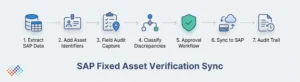
A clean SAP sync model is usually simpler than teams expect. The key is to separate extraction, field evidence, classification, approval, and posting.
-
Extract the working SAP population
Use SAP Asset Accounting as the controlled starting point. SAP’s physical-inventory guidance says to define the scope and create inventory lists. SAP’s inventory-list documentation says you can create sort versions using fields such as location and room and distribute those lists to the people doing the physical inventory.
-
Add the identifiers that make fieldwork workable
Make sure the extract includes the inventory number, barcode, asset number, description, cost center, and location hierarchy. SAP’s own docs say the standard form can include those items, and SAP’s template-field documentation says the inventory number can be printed as a barcode.
-
Perform the physical audit in a field tool that captures evidence
Use a workflow that can record the result of the audit, not just the fact that a list was printed. In practice, that means scanning or confirming identity, capturing current location and condition, and assigning discrepancy codes plus evidence references. SAP partner listings and AssetCues’ own product/integration pages show that the market expects mobile verification and real-time or near-real-time sync patterns for this step.
-
Classify discrepancies by update path
Do not push raw scan outcomes straight into SAP. First, classify them:
-
- Master-data correction.
- Acquisition / create and capitalize candidate.
- retirement/disposal candidate.
- Condition/impairment review.
- Duplicate/stale record.
- Exception needing investigation.
This is where most spreadsheet-led projects break down, because they jump from “found/not found” to “change SAP” without approval logic.
-
Approve the right actions
Finance should approve book-affecting actions. Operations or local owners can review location or custody corrections, but retirement, write-off, and capitalization decisions should not be auto-posted from the field. That approach aligns with SAP’s published distinction between master-data services and posting services, and it also aligns with broader management-control expectations in the US, India, and the UK.
-
Sync into SAP through the right route
- For master-data changes, use your governed SAP update path. SAP ERP FI-AA documentation notes BAPIs for communicating with third-party systems, and SAP S/4HANA Cloud documents an OData V4 service to create, change, and read fixed-asset master records.
- For acquisition-style additions, use the fixed-asset creation plus acquisition/capitalization route after finance validation. SAP S/4HANA Cloud documents an asset-acquisition service.
- For retirements or missing-asset write-offs, use the retirement route rather than a status-only change. SAP S/4HANA Cloud documents a post-asset-retirement service with batch processing, and SAP on-prem documentation also references mass retirement in FI-AA.
-
Keep the audit trail
Keep the extracted SAP list, raw field evidence, discrepancy classification, approval history, and SAP update log together. AssetCues’ software and integration pages explicitly position audit trails, ERP synchronization, and evidence-rich verification as part of the product value. Even if you use a different tool, that is the standard your process should meet.
SAP ERP vs S/4HANA vs S/4HANA Cloud: What Changes?
The control logic stays similar. The integration options change.
Platform |
Officially surfaced capability |
Practical sync implication |
|---|---|---|
| SAP ERP / ECC with FI-AA | FI-AA documentation notes BAPIs for communicating with third-party systems; fixed-asset physical-inventory lists remain report-led | Many ERP projects still use BAPIs, reports, file extracts, and middleware |
| S/4HANA on-prem/private edition | Same FI-AA foundation, plus released CDS views and mass-retirement support | Better analytics/query options and more modern extension patterns |
| S/4HANA Cloud | OData services for fixed-asset master data and for acquisition/retirement postings | API-led sync is more explicit and easier to design cleanly |
SAP has released CDS-view documentation for Asset Accounting, and the documented Cloud services for master data and postings make S/4HANA environments better suited to a governed API-based sync model than a purely spreadsheet-based one. At the same time, the older FI-AA BAPI note in SAP ERP is an important reminder that SAP has long expected third-party integration around Asset Accounting.
Common SAP sync failures to avoid
- Using one output for two different problems
Stock-inventory workflows and fixed-asset verification are not automatically the same thing in SAP. - Updating SAP master data when the audit actually requires a posting
Missing or disposed assets usually need retirement logic, not a quiet location edit. - Letting the field tool become the accounting system of record
The field layer should propose or stage changes. SAP remains the governed book record. - Skipping the barcode / inventory-number relationship
SAP’s own fixed-asset inventory list and template support show that identity fields matter. If those fields are weak, every later sync step becomes harder. - Failing to separate additions from excess assets
“Found in the field” does not automatically mean “capitalizable.” SAP community questions about excess assets in physical verification show that this is a real operational issue.
Country-specific governance notes
→ USA
US readers should ensure the SAP sync design supports management’s internal-control responsibilities, not just operational neatness. SEC guidance on management’s report on internal control over financial reporting makes clear that management cannot conclude controls are effective if material weaknesses exist, which is why unresolved SAP–physical audit gaps matter when fixed assets are material.
→ India
For India, the SAP sync model should make it easier to show “reasonable intervals,” class-wise coverage, and proper treatment of discrepancies in the books. CARO 2020 guidance remains the most practical anchor here.
→ United Kingdom
UK organizations, especially those with distributed estates and material asset controls, should treat unresolved SAP discrepancies as control issues, not just asset-team concerns. Provision 29 applies to financial years beginning on or after 1 January 2026 and pushes boards toward clearer declarations on control effectiveness.
→ South Africa
For South African public-entity contexts, the SAP sync output should be report-heavy. Official tender material expects reports on asset status, location, condition, valuation/impairment or disposal needs, alignment of the asset register to the trial balance, and support for audit queries.
Key takeaways
- Standard SAP already gives finance teams a strong fixed-asset accounting backbone, but not every organization will find that backbone sufficient for mobile, evidence-rich physical audits.
- The biggest SAP design mistake is treating every audit discrepancy as a simple master-data update. Some results require a posting, not a field edit.
- Barcode, RFID, or mobile evidence capture should feed SAP through a governed workflow. They should not overwrite finance records without review.
- In S/4HANA Cloud, SAP documents OData services for fixed-asset master data and asset retirements/acquisitions. In SAP ERP, FI-AA documentation notes BAPIs for communicating with third-party systems.
- This page is intentionally narrower than your earlier cluster blogs. It does not re-teach generic physical verification, policy design, or software selection. It owns the SAP sync architecture.
Conclusion
SAP fixed asset verification is not just about printing a list from FI-AA and checking boxes in the field. The real challenge is deciding what the audit result means for SAP. Not every audit result follows the same path — while some require master data updates, others trigger acquisitions or retirements, and the rest should stay in a finance review queue until formally approved. When teams design that logic up front, physical audits stop being spreadsheet events and start becoming controlled ERP sync cycles.
That is also where AssetCues fits naturally. AssetCues already positions its integration layer around synchronizing physical facts—existence, location, status, users, and condition—with financial asset information, and its fixed asset verification software positions the workflow from import through discrepancy handling and ERP sync. For SAP-heavy organizations, that makes the useful question less about “Can it connect?” and more about “Does it sync the right things, through the right approvals, into the right SAP object?”

FAQs
Q1: Can SAP print barcodes for fixed asset audits?
Ans: Yes. SAP documentation says the inventory number can be output in the standard inventory list for Asset Accounting and printed as a barcode in the relevant template setup.
Q2: Does SAP S/4HANA have APIs for fixed asset sync?
Ans: Yes. SAP S/4HANA Cloud publishes an OData V4 service for fixed-asset master records and separate services for asset acquisition and retirement postings.
Q3: Is the SAP Manage Physical Inventory Documents app the right tool for fixed assets?
Ans: Usually not by itself. SAP’s storage-location-oriented physical-inventory-document apps are built for stock inventory, while fixed-asset verification in FI-AA is documented separately through asset inventory lists and asset master data.
Q4: How should we handle assets found in the field but missing in SAP?
Ans: Treat them as controlled exceptions first. Validate ownership, capitalization threshold, and supporting documents before creating a master and posting an acquisition. SAP community questions show this is a common real-world scenario.
Q5: Can a connected verification layer sync with SAP and still preserve control?
Ans: Yes, if the sync is approval-driven. AssetCues’ integration page describes synchronizing existence, location, status, users, and condition with financial asset data, but the clean design is still to sync approved outcomes rather than raw audit observations.