


Introduction
Need a fixed asset register and do not want to build one from scratch? You are in the right place. This guide gives you a free fixed asset register template in Excel. It also includes a clear, column-by-column format guide and a filled example you can copy. Use it as it is, or treat it as a starting point, and adapt to your business.
New to asset registers? If you want the bigger picture first, what a register is, why it matters and how to maintain it, start with our complete guide to the fixed asset register. This guide is about the template and format.
In this guide, you will learn:
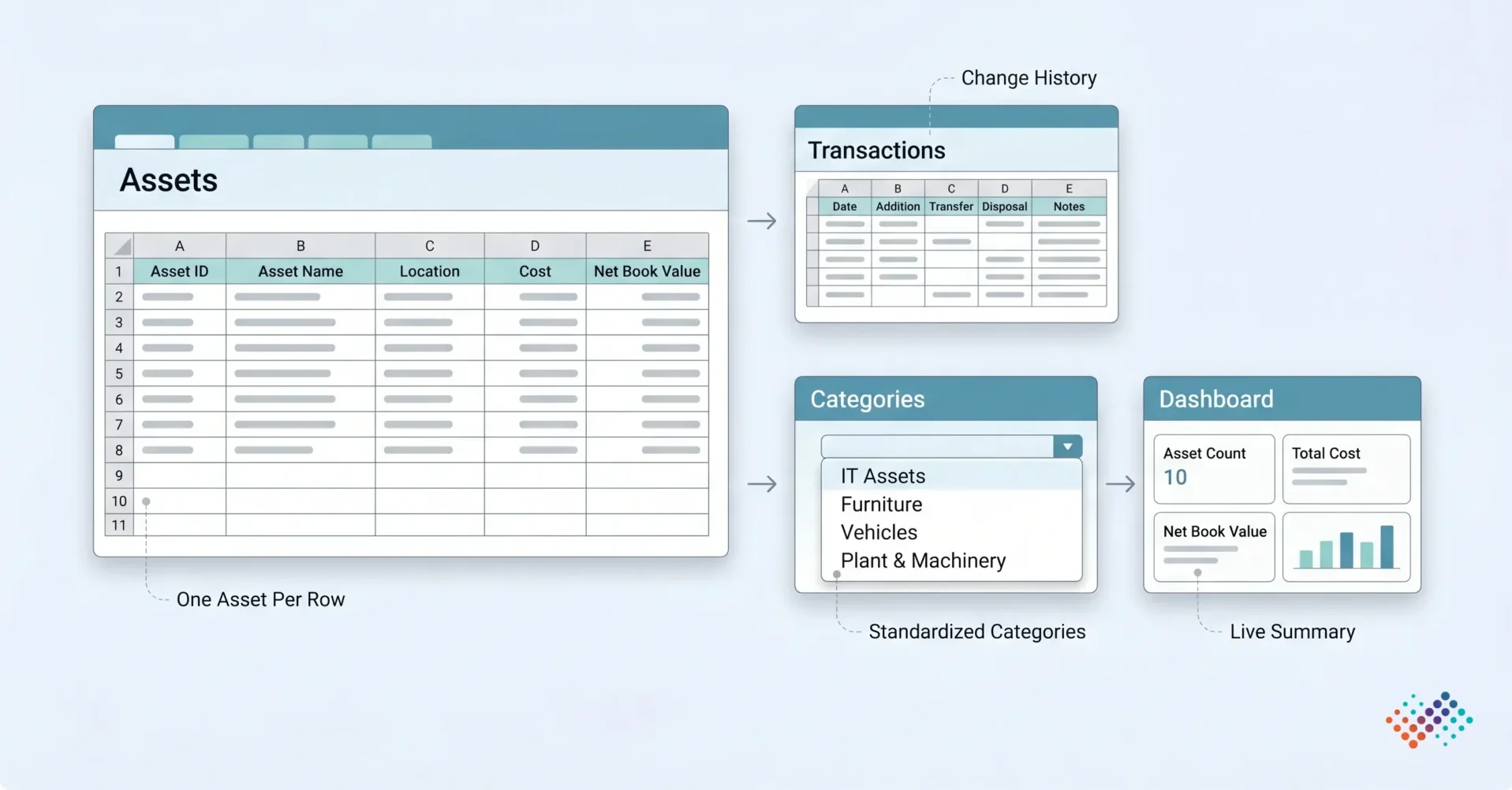
The template is more than a flat list. It uses four tabs that work together, so your register stays clean as it grows:
- Assets: The heart of the register. One row per asset, with all the core columns and a net book value that fills in for you.
- Transactions: A simple log for additions, transfers and disposals, so every change has a date and a note.
- Categories: Your list of asset classes (IT, furniture, vehicles, plant). It feeds the dropdowns on the Assets tab, so names stay consistent.
- Dashboard: Live totals asset count, total cost and net book value by category at a glance.
Fixed asset register format: a column-by-column guide
Here is the format the fixed asset register template uses. Each column has a clear job. The fields line up with the asset-level records that standards such as IAS 16 expect, so the register supports your accounts.
Column |
What to enter |
Example |
|---|---|---|
| Asset ID | A unique code for each asset | FA-IT-0001 |
| Description | Make, model and spec be specific | Dell Latitude 5440 laptop |
| Category | Asset class (from the Categories tab) | IT Equipment |
| Serial number | The maker’s serial number | 5CG1234ABC |
| Purchase date | Date the asset was bought | 12-04-2025 |
| Cost | Purchase cost, plus related costs | $899 |
| Placed-in-service date | Date the asset was ready to use | 20-04-2025 |
| Location/site | Where the asset is | Houston Office, 3rd floor |
| Custodian/department | Who is responsible for it | Finance / David Miller |
| Useful life (years) | Expected life, per your policy | 4 |
| Depreciation method | SLM, WDV or other | SLM |
| Accumulated depreciation | Depreciation booked so far | $113 |
| Net book value | Cost minus accumulated depreciation | $786 (auto) |
| Condition/status | Active, in repair, idle or retired | Active |
| Source document | PO, GRN or invoice reference | INV-2025-0456 |
You do not have to use every column. But keep the Asset ID, description, cost, dates, location, custodian and status filled in for every asset. Those are the ones that make the register usable and auditable.
Two columns deserve a note. Net book value is for reference; your accounting system or ERP holds the official figures and does the depreciation maths. Organisations that require more detailed depreciation tracking may extend the register with useful-life, residual-value, and depreciation-related fields. For a full picture of what a depreciation register should capture and how it feeds the depreciation schedule, that covers exactly which inputs need to be right before the calculation can be trusted.
For Indian reporting requirements, use the register format as per the Companies Act 2013, including relevant Schedule II and compliance-related fields.
How to use the template (step by step)
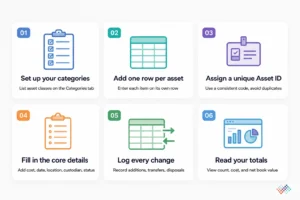
You can be up and running in minutes. Follow these six steps.
- Set up your categories: Open the Categories tab and list your asset classes: IT equipment, furniture, vehicles, plant and machinery. These feed the dropdowns on the Assets tab.
- Add one row per asset: On the Assets tab, enter each physical item on its own row. Do not group units as “Laptops × 50.” Give each one its own line. This is called unitisation.
- Assign a unique Asset ID: Use a short, consistent code. The Excel file flags an ID if you type it twice, so duplicates do not slip in.
- Fill in the core details: Add the description, category, cost, dates, location, custodian, and status. The template works out the net book value for you.
- Log every change: Use the Transactions tab to record additions, transfers, and disposals as they happen, so the register stays current.
- Read your totals: Open the Dashboard tab to see asset count, total cost, and net book value by category.
Keep the register simple and consistent. Accurate asset IDs, locations, custodians, and status updates provide more value than maintaining dozens of rarely used fields.
A filled example you can copy
Here is a short, filled sample so you can see the format in action. Notice the two laptops on separate rows, one per unit, not one line for both.
Asset ID |
Description |
Category |
Location |
Cost |
Status |
|---|---|---|---|---|---|
| FA-IT-0001 | Dell Latitude 5440 laptop | IT Equipment | Houston HO | $900 | Active |
| FA-IT-0002 | Dell Latitude 5440 laptop | IT Equipment | Dallas Branch | $900 | Active |
| FA-PM-0007 | Haas VF-2 CNC milling machine | Plant & Machinery | Plant 1 | $44380 | Active |
| FA-FF-0015 | Herman Miller Aeron chair | Furniture & Fixtures | Houston HO | $1005 | Active |
| FA-VH-0003 | Tata Ace delivery van | Vehicles | Dallas Branch | $7610 | In repair |
For organisations managing primarily IT hardware and software, a hardware asset register may include additional fields such as software licences, warranty information, support coverage, and device ownership details.
When a template stops working
A template is a great way to start, and it can serve a small business for years. But it has limits. Watch for these signs that you have outgrown it:
- You track assets across several sites.
- Your asset count runs into the thousands.
- Assets move or change hands often.
- More than one person edits the file, and versions start to clash.
- You face audit or compliance pressure and need a clear audit trail.
At that point, a spreadsheet’s limits start to cost you: no live accuracy, no field controls and no audit trail. A dedicated system adds those, and a good one will import your spreadsheet, so your work is not wasted. The completed template can serve as the starting dataset for a more controlled asset management process.
As asset volumes grow, organisations often move from spreadsheets to fixed asset register systems that support verification, audit trails, workflow controls, and synchronization with ERP or other business systems.
Key takeaways
- One row per asset: Enter each unit on its own line, never “Laptops × 50” on a single row.
- Unique IDs: Each asset gets a unique ID, and the Excel file warns you if an ID repeats.
- Built-in totals: The dashboard tab sums asset count, cost and net book value by category.
- Know its limits: A template is great to start; many sites, high volume or audits are signs to move to a system.
Conclusion
A fixed asset register template simplifies the process of organising and maintaining asset records from the start. Furthermore, a standard asset register format helps teams capture essential information in a consistent and auditable way. When businesses use an asset register Excel template and record changes promptly, they can keep records accurate, strengthen oversight, and make more informed asset management decisions.
AssetCues Fixed Asset Register Software provides a centralized, audit-ready register that keeps asset records accurate, current, and easy to manage. It helps organizations maintain complete asset visibility across the asset lifecycle while supporting compliance and physical verification activities.
Frequently asked questions
Q1. How do I avoid duplicate asset records in a template?
Ans. Give every physical unit its own unique Asset ID, and use a validation rule that warns you when an ID is entered twice. The Excel version of this template does this for you.
Q2. Should each asset be one row?
Ans. Yes. Enter one row per physical unit. This lets you track each asset’s location, custodian, condition and disposal on its own. A single “many units” row hides all of that.
Q3. When should I stop using a template?
Ans. When you manage several sites, high volume or frequent moves, or face audit pressure. At that point, a spreadsheet’s lack of controls and audit trail becomes a risk, and a dedicated system is the safer choice.