


Introduction
Almost every asset register starts life as a spreadsheet. For a while, that is exactly right. If you are unsure about the asset register meaning and what it should contain, covering unique IDs, purchase cost, location, ownership, and depreciation details, that is a useful starting point before deciding which tool is right for you.
The question is not whether Excel is “bad”; it is when a spreadsheet stops being safe enough for the job. This guide gives you a straight answer, a quick way to check where you stand, and a safe path to move if you have outgrown it.
In this guide, you will learn:
- When a spreadsheet is sufficient for maintaining a fixed asset register, and the practical signs that indicate an organisation has outgrown Excel.
- The hidden risks and limitations of spreadsheet-based asset registers include version control issues, missing audit trails, and ghost assets.
- The additional controls, audit capabilities, and operational benefits that dedicated asset register software provides over spreadsheets.
- How to migrate safely from an asset register spreadsheet to a system, and the key factors to consider when selecting asset register software.
Is a spreadsheet good enough for a fixed asset register?
For a small, single-site asset base with one person looking after it, yes, a spreadsheet can be a perfectly good fixed asset register. It is cheap, familiar, and quick to set up. If you do not want to build one from scratch, the asset register format gives you a free Excel template with a column-by-column guide and a filled example you can copy and adapt. Many businesses run on one for years.
It becomes risky as you grow. A spreadsheet is a snapshot, so it drifts out of date the moment an asset moves. It has no controls on what people type, no record of who changed what, and no easy way to prove an asset exists. When volume, sites, movement, and audits pile up, those gaps turn into real costs. The honest answer, then, is: fine to start, risky to scale.
The hidden limits of an asset register spreadsheet
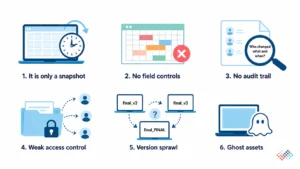
The problems are easy to miss until they bite:
- It is only a snapshot: It is accurate the day you update it, and out of date by the next move.
- No field controls: Any cell can hold anything. Typos, blank fields, and inconsistent categories creep in.
- No audit trail: There is no record of who changed a value, or when exactly what an auditor wants to see.
- Weak access control: File sharing is all-or-nothing, and copies multiply.
- Version sprawl: “final_v3”, “final_FINAL,” and three people editing different copies.
- Ghost assets: Disposed items linger because nothing forces an update, so the register overstates what you own.
Signs you’ve outgrown Excel: A quick readiness check
You do not need a formal study to know. Count how many of these are true for you today:
- You track assets across more than one site.
- Your asset count runs into the thousands.
- Assets move, transfer, or get disposed of often.
- More than one person edits the register.
- You face audit or compliance pressure (for example, CARO, GRAP, ISO 27001, or SOX).
- Reconciling the register to the general ledger takes days, not minutes.
- You have ghost assets, or records you cannot trace to a physical asset.
One or two means a spreadsheet is probably still fine, with discipline. Three or more is a clear signal to move to a system before the next audit. A three-site team juggling several copies, or an audit that stalls because there is no change history, are the classic tipping points.
What an asset register system adds
A dedicated system is not just a fancier spreadsheet. It closes the gaps above by design:
Capability |
Spreadsheet |
Asset register system |
|---|---|---|
| Accuracy over time | Snapshot: goes stale on every move | Updated as events happen |
| Field controls | None; any cell editable | Validation, required fields, dropdowns |
| Audit trail | None | Every change is logged with the user and time |
| Access control | File-level at best | Role-based by user |
| Verification | Manual | Mobile scan, photo, and location evidence |
| Duplicates/ghost assets | Easy to create | Flagged and controlled |
| Finance / ERP sync | Manual re-keying | Approved changes synchronised |
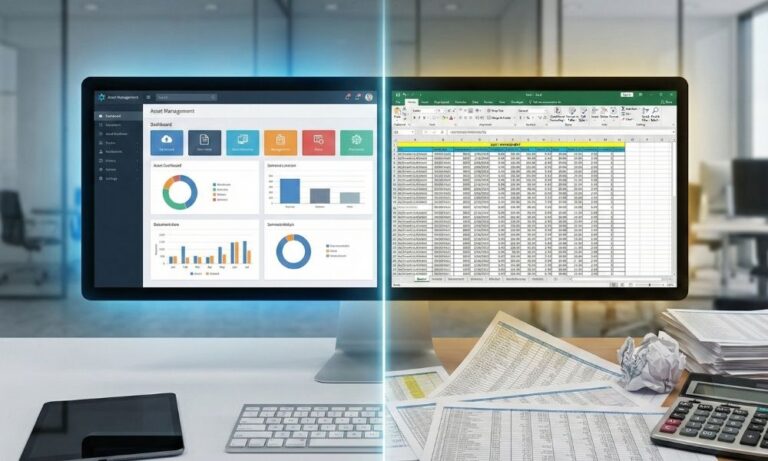
| Multi-site, high volume | Strains quickly | Designed for it |
In short, a system turns the register from a static list into a controlled process, which is what audits, multiple sites, and real asset movement demand.
What to keep from your spreadsheet
Moving to a system does not waste the work you have done. Your spreadsheet is a valuable starting dataset; it already holds your asset list, IDs, costs, and locations. A good migration imports it, cleans it, and builds on it. You are not starting over; you are giving your existing data a better home. The discipline you built around the spreadsheet, your categories, and your ID scheme carries across, too.
How to migrate from Excel to a system safely
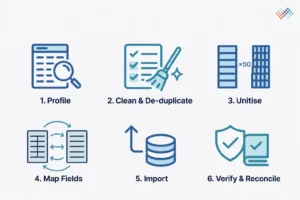
A move goes wrong when teams import a messy sheet as-is. Do it in order instead:
- Profile your spreadsheet. Check volume, number of sites, how many people edit it, and obvious duplicates or gaps. This tells you the size of the clean-up.
- Clean and de-duplicate. Fix blanks, standardise categories, and resolve duplicate records before they move.
- Unitise multi-quantity lines. Split “Laptops × 50” into one row per asset, so each unit can be tracked on its own.
- Map your fields. Match your columns to the system’s fields, so nothing is lost in the import.
- Import. Load the cleaned data into the system.
- Verify and reconcile. Confirm assets exist, tag them, and reconcile the new register to the general ledger after go-live.
How to choose asset register software
Once you have decided to move, the next question is which system. Start from your control objective, audit readiness, multi-site tracking, ERP sync, verification, and judge tools against that, not a feature list. Check the basics too: does it import your spreadsheet, sync with your ERP, support mobile verification, and is the vendor’s security posture sound?
If ISO 27001 certification is a requirement, understanding what an ISO 27001 asset register involves, covering information assets, named owners, and security classifications, helps you evaluate whether a vendor’s security posture is genuinely audit-ready. Look for SOC 2 or ISO 27001 certifications as a baseline.
Key takeaways
- A spreadsheet is fine until it isn’t: Small, single-site, one editor is OK; scale and audits change the picture.
- The risk is hidden: A spreadsheet has no audit trail, no field controls and goes stale on every move.
- Know the signals: Multiple sites, high volume, frequent moves, several editors, and audit pressure mean it is time.
- You won’t lose your work: A good system imports your spreadsheet as its starting dataset.
- Migrate in order: Profile, clean, unitise, import, then verify and reconcile.
Conclusion
An asset register spreadsheet can support asset tracking in the early stages, but it often becomes harder to manage as assets, users, and locations increase. In contrast, an asset register system provides stronger control, clearer accountability, and more reliable records. Furthermore, asset register software helps organisations maintain accurate data, simplify audits, and reduce administrative effort.
For Indian companies, a fixed asset register as per the Companies Act adds another layer of compliance, covering Schedule II depreciation and statutory audit requirements that a spreadsheet cannot reliably support at scale. As a result, businesses can manage assets more effectively while supporting long-term compliance and operational efficiency.
AssetCues Fixed Asset Register Software helps organisations maintain a centralised, audit-ready asset register with real-time updates, lifecycle tracking, and complete audit trails. By synchronising financial and operational data, it ensures accurate records, stronger controls, and improved asset visibility across the enterprise.
Frequently asked questions
Q1. Will I lose my spreadsheet work if I switch?
Ans. No. A good system imports your spreadsheet, so it becomes the starting dataset. Your asset list, IDs, costs and categories carry across rather than being re-keyed.
Q2. Is cloud asset register software safe?
Ans. Reputable platforms use strong access controls and recognised certifications such as SOC 2 or ISO 27001. Confirm the vendor’s security posture and data handling during your evaluation.
Q3. Which asset register software is best?
Ans. It depends on your control objective and scale, so judge tools against your own needs rather than a generic ranking. Our fixed asset management software comparison sets out how to evaluate the options.