


Introduction
NetSuite fixed asset management runs through the FAM SuiteApp, an optional, separately licensed module that turns transactions into asset records, depreciates them on schedule, and posts the journals back to the ledger. Teams that also run SAP can see how fixed asset in SAP work end to end, covering FI-AA master data, lifecycle t-codes, key reports, and the physical verification layer the module leaves to you.
This NetSuite fixed assets guide answers the questions admins and controllers actually ask: setup, depreciation, mid-life imports and the two nobody publishes straight: the documented limits and what the module really costs. Format matches the questions: every section is an answer. The limits section cites Oracle’s own help documentation line by line, because the strongest evidence for where FAM stops is what its maker discloses.
In this guide, you will learn:
- What NetSuite FAM manages, how assets move from transactions to records and depreciation, and where its accounting scope ends.
- How to configure NetSuite FAM, manage asset creation, depreciation, reporting, subsidiaries, roles, and mid-life asset imports.
- Why documented limits around processing, licensing, reporting, single-book accounting, and scripted workflows matter when evaluating NetSuite FAM for larger organisations.
- How to decide between extending FAM and adding physical verification based on accounting depth, floor-level visibility, reconciliation, and audit evidence requirements.
What Is the NetSuite Fixed Asset Module (FAM SuiteApp)?
The NetSuite fixed asset management module is a managed SuiteApp bundle, sold as an optional add-on to core NetSuite. It creates asset records from purchase transactions or manual entry, maintains depreciation on your defined methods, handles transfers, revaluations, and disposals, and posts the resulting journals to the general ledger with the asset history attached — one system, no export-import loop for the accounting itself.
NetSuite asset management is broader than FAM and can include maintenance, field service, and rental capabilities delivered through other modules and products. FAM is specifically the fixed asset accounting engine, so this guide focuses on its accounting, depreciation, and asset-record capabilities.
How Do Fixed Assets in NetSuite Get Created?
Three routes put fixed assets in NetSuite. The standard path: a purchase transaction becomes an asset proposal, and Propose New Assets converts approved proposals into records a scheduled script runs when you click it, per Oracle’s FAM FAQ. Manual creation covers assets without a source transaction.
The third route mid-life import is the migration path, and it deserves respect: in-service assets arrive with accumulated depreciation, prior methods and partial periods. CSV imports into the fixed asset module NetSuite provides need staging, validation and a reconciliation pass before anyone trusts the balances.
How Do You Set Up NetSuite FAM?

- Install the managed bundle (updates push automatically which also means upgrade timing is not fully yours; see the limits table).
- Define asset types with their default accounts, useful lives and depreciation methods the FAM NetSuite ships lets you define methods on your own rules.
- Map subsidiaries and locations; depreciation posts in the subsidiary where the asset resides.
- Set roles and permissions for proposal, approval, disposal and reporting duties.
- Pilot with one asset class end to end proposal, depreciation run, report, disposal before migrating the asset base.
How Does Depreciation Work and What About Reports?
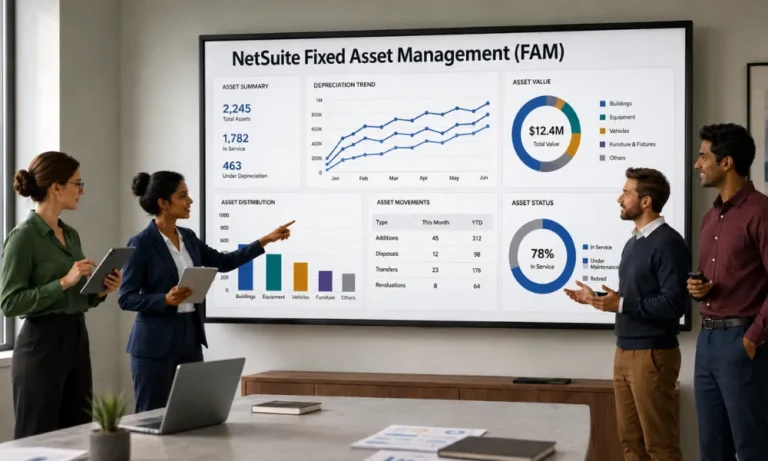
Depreciation runs as a background process against your methods and conventions, posting journals per subsidiary; reports cover asset registers, depreciation schedules and rollforwards, filterable by location per Oracle’s FAQ.
Two practical notes: large organisations should schedule runs deliberately because processing is script-based, and the fixed asset management NetSuite offers natively maintains one set of books the parallel-books question belongs in the limits table below, because Oracle answers it directly.
What Are the Documented Limits of NetSuite Fixed Asset Management?
Every row below cites Oracle’s own NetSuite Help documentation and FAM FAQ information. This is a compilation of the relevant information, not a criticism.
Sr No. | Documented limit (Oracle’s NetSuite help, FAM FAQ) | Practical effect |
|---|---|---|
| 1 | Processing across subsidiaries may cause some scripts to time out | Multi-subsidiary organizations need deliberate run scheduling and volume planning |
| 2 | The Multiple Queue feature that optimizes depreciation requires a SuiteCloud Plus license | Depreciation throughput at scale is a licensing decision, not a toggle |
| 3 | Saved searches used by the module can hit limits | Very large registers can outgrow the reporting path |
| 4 | The module does not generate a parallel set of books one set, GAAP based | Multi-book needs (tax, IFRS alongside) require workarounds or extension products |
| 5 | Bundle upgrades fail while a background process is In Progress; retries within 24 hours, then support involvement | Upgrade windows need coordination on busy organizations |
| 6 | Propose New Assets runs a scheduled script | Asset creation is queue-and-script bound at volume |
One more boundary that is scope rather than defect: a physical verification workflow tagging, mobile counts, scan and photo evidence, floor-to-record reconciliation is not part of the module’s documented scope.

What Does the Module Actually Cost?
Three components, no figures printed here because pricing changes and quotes vary: the FAM SuiteApp license itself Oracle’s FAQ states plainly it is an optional module for sale, separate from core NetSuite; tier variables, including SuiteCloud Plus if depreciation throughput needs the multiple-queue feature (limit 2); and implementation – migration, staging, configuration, training.
Published third-party cost evidence exists and is ledgered for this guide. Confirm current numbers with your NetSuite account executive, in writing, per module and license line and date the quote.
The cost nobody quotes is workaround time: managing single-book limitations, monitoring script windows, and maintaining spreadsheet reconciliations all create recurring administrative hours. Price those honestly against any extension or layer you evaluate.
Where Does Physical Verification Fit? (The Prebuilt Connector)
Everything above manages the fixed assets NetSuite carries as records; none of it proves the floor. That is AssetCues’ job as the ERP control layer NetSuite keeps the accounting; AssetCues keeps the record true: tags linking every unit to its asset record, AI-powered verification with scan validation and image and condition recognition, exception workflows, and approved changes synchronized back continuously.
For organizations that use NetSuite, AssetCues offers a prebuilt connector rather than requiring a custom integration project. The connector can read asset master data from NetSuite and write approved physical changes back. Organizations using other ERP, ITSM/CMDB, or HRMS systems can connect those sources as well, allowing AssetCues to bring asset data together across the systems they already use.
The layer’s scope is three components, not one: capitalization control upstream readiness and evidence captured before the asset record exists verification and tagging in service, and FAR accuracy through continuous, automated reconciliation. NetSuite keeps the books; AssetCues keeps all three true.
When Should You Extend FAM or Add the Layer? (The NetAsset Pattern)
The extension market exists because the limits table is real. Netgain’s NetAsset is the visible pattern: a NetSuite-native fixed asset subledger extending the module’s accounting depth verify current capabilities against Netgain’s official documentation before shortlisting. This is separate from Oracle Cloud Fixed Assets, the fixed-asset module built into Oracle’s own ERP rather than into NetSuite.

The decision logic is straightforward. If your pain is in books, transaction throughput, and reporting depth, evaluate a subledger extension. If your pain is on the floor—asset existence, custody, condition, and audit evidence—a verification layer addresses the gap and complements either choice rather than competing with it.
What About NetSuite Asset Maintenance?
NetSuite asset maintenance: preventive schedules, work orders, and technician workflows is a different discipline from fixed asset accounting, served by different tooling. FAM records maintenance-related events that affect an asset’s value; it does not plan the work. If maintenance execution is the actual need, evaluate the CMMS category on its own terms.
Key Takeaways
- FAM is an optional, separately licensed SuiteApp: transactions to asset records to depreciation to posted journals, one set of books.
- The documented limits are Oracle’s own disclosures scripts, queues, licensing, single-book compiled here with the source.
- Cost has three components plus the one nobody quotes: recurring workaround hours.
- Extensions fix accounting depth; the verification layer fixes floor truth different pains, complementary fixes.
- The NetSuite connector is prebuilt: verification results flow back under approval, continuously.
Conclusion
Run FAM for what it is a competent, script-bound accounting engine with disclosed limits and decide the rest deliberately: extend when the books need depth, add the verification layer when the floor needs proving, and price the workarounds you would otherwise absorb. Fixed asset management in NetSuite works best when the module does the accounting and the evidence comes from somewhere that walked the floor.

NetSuite FAM: Rapid Answers
Q1. Is FAM included with NetSuite?
No – Oracle’s documentation states it is an optional module for sale, licensed separately from core NetSuite. Depreciation throughput at scale can add a second licensing decision, because the Multiple Queue feature that optimizes processing requires a SuiteCloud Plus license. Confirm current pricing and license lines with your NetSuite account executive in writing.
Q2. Can NetSuite FAM run parallel books for tax or IFRS?
Not natively: Oracle’s FAM FAQ states the module does not generate a parallel set of books it maintains one, GAAP based. Organizations needing tax or IFRS books alongside typically evaluate subledger extensions or run controlled workarounds; either way, treat multi-book as a requirement to design for, not a setting to enable.
Q3. Does NetSuite FAM handle barcode scanning or physical verification?
Physical verification – tagging, mobile counts, scan and photo evidence, floor-to-record reconciliation – is not part of the module’s documented scope. FAM is the accounting engine. Oragnisations that need floor truth add AssetCues’ AI-powered verification layer with a prebuilt NetSuite connector, so approved physical changes synchronize back to the asset records continuously.
Q4. Why is my FAM bundle upgrade failing?
The documented cause: upgrades do not proceed while a background process is In Progress. Oracle retries within 24 hours; if it still fails, administrators set stalled background processes to Inactive waiting out any running depreciation or report first and coordinate with support. Plan upgrade windows around depreciation runs on busy environments.


