


Presence is not identity
A scan proves a tag exists — not that the right asset is behind it.
Condition drifts unseen
Damage and deterioration develop between audits, with no record until something fails.
Substitution hides in plain sight
A replacement can look similar, and a substituted or ghost asset can sit behind a perfectly valid tag.
Tags can be manipulated
A tag that is moved, altered or re-associated quietly undermines the audit trail.

Capture
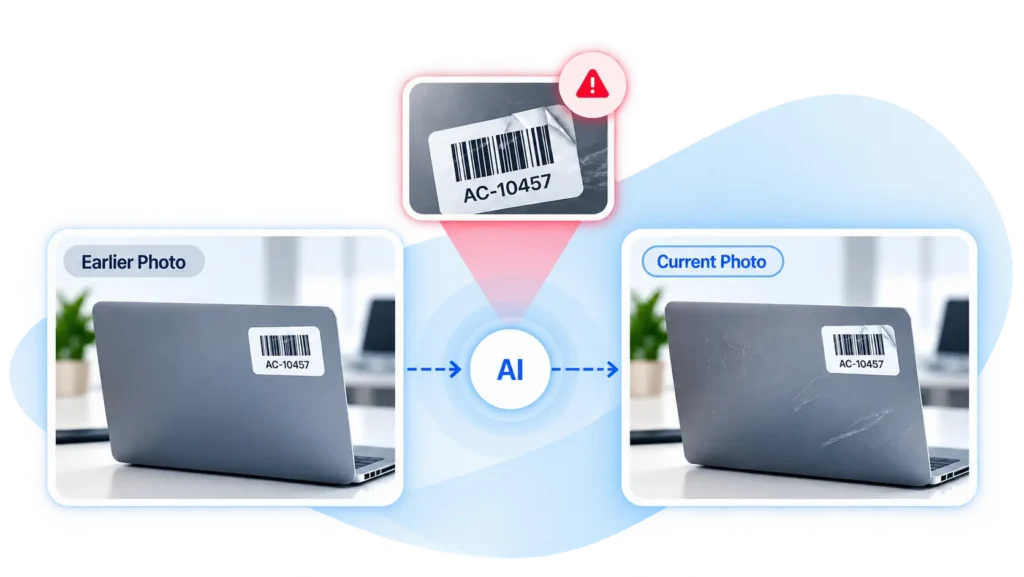
The current audit photo is taken during physical verification — the same evidence your program already collects.

Compare
The co-pilot analyzes the new photo against the available baseline: the original tagging photo, a previous audit photo, or both.
Flag
Visual inconsistencies, abnormal condition changes and suspected tag issues are raised as findings, each with the photo evidence behind it — automated discrepancy detection in fixed assets, applied photo by photo.
Review and confirm
Teams interpret the flagged changes, request a recheck where needed and confirm the outcome through the audit workflow. Identical units may require serial or tag evidence as well as photos.
Identity intelligence
Compares the current photo with the asset’s photographic history and flags visual inconsistencies that may indicate a different asset is being presented — often the first visible signal in AI ghost asset detection, surfaced as a finding, not a verdict.
Condition intelligence
Analyzes visible changes against earlier condition evidence, highlighting abnormal wear, damage or deterioration that deserves follow-up.
Tag integrity checks
Flags visible signs that a tag may have been altered, moved or associated with another asset, and brings suspected manipulation into review with the photo evidence attached.
Put history to work
Earlier tagging and audit photos become useful inputs to the current verification — the baseline for every automated fixed asset verification check.
Surface changes for investigation
Visual identity, condition and tag concerns are drawn into focus, so attention goes where change happened.
Connect findings to follow-up
Rechecks and decisions are supported by the evidence behind the exception. Follow-up starts from facts.
