
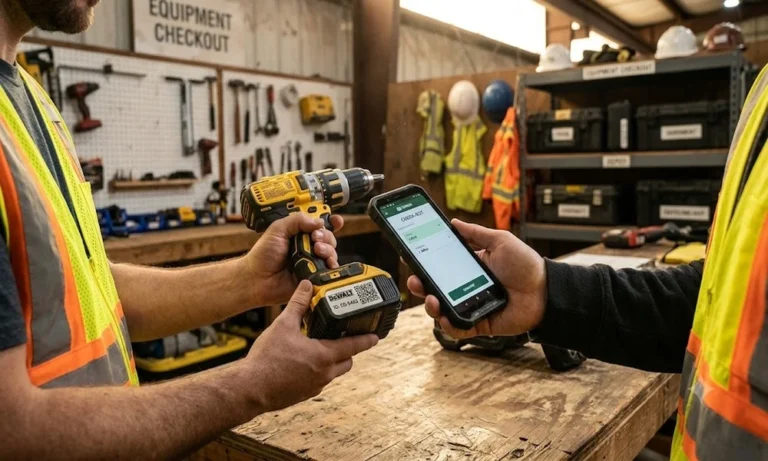


Introduction
Tools and equipment tracking gives every tool, kit, and piece of portable equipment a unique identity, then records each issue, return, transfer, and third-party handover against it. Barcode, QR, RFID, Bluetooth, or GPS capture the evidence, and the right tool tracking software gives every tool one custody record backed by scan evidence rather than memory. The custody record decides who is responsible and where the item was last confirmed.
In this guide, you will learn:
- What tools and equipment tracking covers, and how custody records differ from fixed asset tracking, stores inventory, maintenance, and fleet systems.
- How to choose barcode, QR, RFID, Bluetooth, or GPS based on tool class, movement patterns, operating conditions, and required evidence.
- How to select durable tags and tracking methods for metal tools, kits, calibrated instruments, portable plant, and third-party equipment.
- How to run the custody loop through issue, acknowledgement, transfers, returns, vendor handovers, overdue follow-up, counting, and exception closure.
What is tools and equipment tracking?

Tools and equipment tracking covers reusable items that people take, use and bring back: hand and power tools, test and measuring instruments, lifting gear, kits and portable plant. An equipment tracking system records each item’s identity, current holder, last confirmed location and condition, with the history of every movement in between. The job it supports is easy to state: find the item, and know who answers for it.
It also differs from fixed asset tracking, which confirms at periodic counts that registered assets exist where they are booked. Tool tracking records custody at every issue and return, which can mean several times a week. Items that are used up and replenished, such as blades, abrasives and fasteners, belong in stores inventory. Whether a tool also sits on the register is Finance’s decision, not a tracking one.
What tools and equipment tracking covers, and what it hands off
Item type | Tracked here? | Where it belongs instead |
|---|---|---|
| Hand tools, power tools, instruments, lifting gear | Yes: identity, holder, location, condition | This record |
| Kits and tool sets | Yes: the kit and each component it contains | This record |
| Portable plant such as generators, compressors and pumps | Yes: identity, site custody and movements | This record |
| Tooling and fixtures held by vendors or job workers | Yes: owner unchanged, external holder recorded | This record |
| Consumables (blades, bits sold as packs, fasteners) | No | Stores inventory and replenishment |
| Vehicle dispatch and engine data | No | Fleet and telematics systems |
| Maintenance scheduling and work orders | No; condition evidence links to the item | Maintenance (CMMS) system |
Why do tools go missing? The custody gap
A tool can drift out of control rather than disappear in one event. A grinder passes from one crew to another without a record. A gauge goes to a supplier for a job and stays there. A generator sits at a finished site while another site hires one. Each step looked harmless at the time, and nobody ever formally accepted responsibility for the item.
The first gap is assignment without acceptance. A spreadsheet that says a crew lead has the laser level is a statement by whoever typed it. Until the holder confirms receipt, accountability can be disputed, and returns depend on memory and email. A custody record needs an acceptance event at issue and a confirmed return, not just a name in a column.
The second gap opens when tools leave the organisation. Fixtures go to a job worker, a meter goes out for calibration, a pump stays with a contractor after the contract ends. Dispatch paperwork shows what left, but not who holds it now, what condition it is in, or whether it is coming back. Those items are still yours, and they are the hardest to evidence at audit.
Two quieter gaps follow. Records go stale when the location field shows where a tool was issued rather than where it was last confirmed, so every search starts in the wrong place. And idle equipment stays hidden, so one site buys or hires what another site already owns.
Treat published loss figures with care. Some widely shared numbers mix heavy-equipment theft with small-tool losses, or appear without a source. A baseline from your own records is more useful: items unaccounted for at the last count, items still out past their return date, and vendor-held items with no recent confirmation. Review those three numbers monthly.
Which tracking method fits which tool class?
Tracking methods form a ladder, from a scanned label to powered trackers and installed readers. Each step up costs more and proves something different, so choose by tool class and by the evidence your control needs, not by the most advanced option on offer. Below table gives a starting point for each class.
Method ladder by tool class
Tool class | Typical holder and movement | Starting method | What a scan or read proves | Step up when |
|---|---|---|---|---|
| Hand tools | Issued from a crib to employees and crews | Barcode or QR label scanned at issue and return | The item was identified by a named user at a recorded time and place | A crib holds hundreds of items and counts take too long: RFID |
| Power tools | Crews moving between sites | Barcode or QR with holder acknowledgement | Identity read by a named user at a recorded time; the holder only once acknowledged | High-value units leave sites unrecorded: Bluetooth tags for last-heard presence |
| Calibrated instruments | Specialists; periodic external calibration | Barcode or QR with calibration evidence on the record | Identity read at issue, plus the calibration evidence on the record | Instruments are counted in bulk or kept in controlled cabinets: RFID |
| Kits and tool sets | Issued and returned as one unit | Kit ID plus an ID for each component | Which components were present at issue and return | Kits are checked often and in volume: RFID on case and components |
| Portable plant | Sites and yards, often outdoors | Barcode or QR scanned at dispatch and receipt | Departure or arrival at a site when scanned | Units sit across dispersed outdoor sites: a powered GPS tracker |
| Tooling at vendors and job workers | Third parties | Barcode or QR with handover and takeover records | That the holder responded, not independent proof the item exists | Value or volume justifies physical checks at the holder’s site |
Read the table by its fourth column: The evidence a method produces is what it is worth.
A barcode scan proves that a person read an identity at a moment. An RFID read proves a tag was inside a reader’s field. A GPS fix proves where a powered tracker was when it reported, and a vendor confirmation proves the vendor answered. None of them, on its own, proves who is responsible. That comes from the custody loop, described later in this guide.
Mixing methods is common and workable. A crib may count hand tools by RFID, issue them with a barcode scan and track two generators by GPS. What matters is that every observation lands on the same identity, so one tool never becomes three records.
Which tool tracking tags survive tools and site conditions?
Tool tracking tags fail in predictable places: on grips that wear through, near heat and exhausts, under solvents, and on metal bodies that detune standard RFID labels. When teams compare tracking tags for tools, the useful question is not which tag is toughest, but which tag suits this surface and this abuse. Choose by surface, then test on the tool before buying in volume.
Tags for tools: where each works
Tag type | Works well on | Watch for |
|---|---|---|
| Laminated polyester label | Plastic housings, cases and indoor tools | Abrasion on handles; solvents can lift the adhesive |
| Anodised aluminium or metal plate, bonded, or riveted only where the maker permits | Power tools, plant and outdoor equipment | Needs a flat area; never drill a tool body without the maker’s approval |
| Laser-etched or dot-peen ID or 2D code | Small metal hand tools | Needs a capable imager; test contrast on worn and oily surfaces |
| Embedded or epoxy-domed RFID tag | Hand tools with a recess or flat face | Must be rated for metal when bonded to a metal body |
| On-metal RFID tag | Metal power tools, instruments and plant | Larger footprint; placement changes read direction |
| Bluetooth tag (battery-powered) | High-value power tools and portable plant | Battery life and a replacement routine; protected mounting |
The right tag is the one that is still readable at the next count, on that tool, in that environment.
Place tags away from grips, triggers, vents and moving guards, and in the same position on every tool of a model, so whoever scans knows where to look. A cable tie through a lanyard point, a recessed mount, or rivets where the maker permits them outlast adhesive alone on tools that are thrown into bins and vans.
Tools too small for any tag can be tracked through their container. Tag the case, pouch or shadow-board position, and record it as a kit with its components listed.
RFID tool tracking: Crib portals, kits and calibration evidence
RFID tool tracking earns its cost where many tagged items need counting together: a tool crib, calibration lab, van stock or kit case. A handheld reader can count a shelf without line of sight, while a fixed crib-door reader can observe tagged items as they pass. The set-up depends on the right tags because metal tool bodies can reflect and detune standard labels.
RFID tags for tool tracking are typically on-metal or embedded types. Higher frequencies generally penetrate metals and liquids less effectively than lower ones and recommends site surveys to identify interference. Low- and high-frequency embedded tags tolerate metal better but read at shorter ranges, while on-metal UHF tags support shelf and doorway counts. Test candidate tags on the actual tools and in the actual crib before committing.
A crib-door reader needs care. A door read shows that a tag was near the antenna, not which way the tool went or who took it. Pair it with an issue transaction or directional reader before treating it as movement. An unread tag is a question to review, not proof that the tool is gone.
Kits suit RFID when the case lets signals through. A case tag plus component tags can let a reader check a non-metal case without unpacking it. Any unread component stays unconfirmed for a manual check, not marked missing. Steel toolboxes and aluminium cases can block reads, so test the case first. Keep the kit and components as separate identities so gaps point to specific items.
RFID for Calibrated Instruments and Custody History
Calibrated instruments need their evidence linked to the item. Link the current certificate and due date to each instrument and check them at issue, so an out-of-date gauge is stopped at the counter.
Custody history pays off in the other direction too. When a returned instrument fails calibration, its record shows who held it and where since its last good calibration, so the work it touched can be reviewed.
When is barcode or QR enough for tools?
Barcode or QR is enough wherever a person already handles the tool at each custody change: the counter issue, the return, the site receipt. The scan adds identity and a timestamp to an action that happens anyway, at a low running cost. A phone can do the scanning, and labels are cheap to replace when they wear.
Barcode falls short in three situations: when items must be counted in bulk, when no label survives the conditions, and when people skip the scan because it is inconvenient. The last one is a process problem, not a technology problem, and the fix belongs at the counter. The counter routines, exception handling and the record each transaction should leave are covered in our barcode tool tracking playbook.
What can GPS and Bluetooth tool trackers do, and what can’t they?
GPS and Bluetooth trackers answer a different question from scanning: where was this item when its tracker last reported? That is valuable for portable plant and high-value power tools, provided the limits are planned for rather than discovered after rollout.
GPS trackers
A GPS tracker needs power, a clear view of the sky and a way to transmit its position. Accuracy depends on factors such as atmospheric conditions, signal obstruction and receiver quality. Inside a building, container or steel van, the signal can be blocked. GPS therefore works best for generators, compressors and site equipment that operates outdoors and can support a powered tracking unit.
A spanner is a different case. A hand tool rarely has room for a device carrying the battery and radio that GPS reporting needs. The places hand tools are kept, such as cribs, vans and toolboxes, are also the places where satellite signals struggle.
Bluetooth tags
Bluetooth Low Energy (BLE) tags are small and battery-powered, which is why they appear on power tools. A BLE tag is detected when a phone, gateway or locator hears it. An article on the Bluetooth SIG blog explains that signal strength alone suits room- or work-cell-level presence. Finding direction needs antenna arrays and more deliberate infrastructure planning.
In practice, a power tool tracking system built on Bluetooth tags tells you the last zone, gateway or phone that heard a tool. That helps a search, but it is not a custody record: a gateway can hear a drill on site, yet it cannot show which crew accepted it.
How does the custody loop work for tools?
The custody loop is the sequence of recorded events that keeps one person or party answerable for every item at every moment. Tracking technology feeds the loop; it does not replace it. Tracking tools and equipment well means running the same seven steps for every class:
- Identify: Tag the item and register its class, kit structure, owner and home location before its first issue.
- Issue: Scan the item to a named holder, whether an employee, a crew or a site, and capture the holder’s acknowledgement and an expected return date.
- Move: Record each transfer between sites as two events, dispatch at the source and receipt at the destination, so items in transit stay visible.
- Return: Scan the item back, record its condition and, for kits, check every component.
- Hand over: When an item goes to a vendor or job worker, record the third party as holder with the dispatch reference, purpose and expected return.
- Chase: Route overdue and vendor-held items to a named owner, and collect dated confirmations from third-party holders.
- Count and close: Count each class on an agreed cadence, review every unconfirmed item, and close each exception with a recorded decision.
Steps 2 and 4 are where accountability is won or lost. An issue without acknowledgement leaves the holder free to dispute it later, and a return without a condition check passes damage on to the next user.
Vendor-held and third-party tools
Third-party custody needs its own rules, because the item leaves your control but stays your asset. Keep the item’s identity and owner unchanged while the record shows the external holder and site. Record each handover, confirmation, inspection and takeover against that same record, so both sides can agree what remains outside.
Because a confirmation shows only that the vendor responded, schedule physical checks at the holder’s site for higher-value tooling, and agree in advance what the vendor may see and confirm. The wider pattern for containers, fixtures and equipment at vendors is covered in our guide to returnable and vendor-held asset tracking.
What should software for tools and equipment do?
Spreadsheets and sign-out sheets hold up until the number of tools, holders or sites grows past what one person can keep straight. Software earns its place when it makes the custody loop the easiest path: a scan at the counter, a confirmation from the holder, and an exception that lands with a named owner. When comparing options, look for:
- Acknowledgement at issue: The holder confirms receipt, and returns are scanned with condition captured.
- Kit and component identities: A kit issues as one unit, and returns are checked component by component.
- Transfers as two events: Dispatch and receipt are separate, with approvals where your policy needs them.
- Third-party holders on the record: Vendors and job workers appear as holders while ownership stays unchanged.
- Several capture methods on one identity: Barcode, RFID and tracker observations update the same record.
- Exceptions with owners: Overdue, unconfirmed and damaged items appear on views that a named person must close.
Best practices for tools and equipment tracking

- Name a custody owner for every crib and site (stores or site lead; reviewed monthly): One person answers for open items at each location, not “the team”.
- Separate personal-issue kits from shared tools (stores; at set-up): Personal kits stay assigned for long periods, while shared tools carry short loan periods and stricter return checks.
- Set return periods by tool class (Operations; reviewed quarterly): Short loans for shared hand tools, project-length periods for site equipment, so “overdue” means something.
- Make the leaver process a custody check (HR with stores; at every exit): No final clearance until the leaver’s open items are returned or reassigned with acknowledgement.
- Retag at the counter, not at the audit (stores; at every return): Replace worn or unreadable tags when the tool comes back, and retire the old ID with a reason.
- Search idle equipment before approving a purchase or hire (procurement with Operations; every request): Check available items at other sites first.
- Quarantine failed and out-of-date items at return (stores; at every return): Give damaged, incomplete and calibration-expired items a separate status so they cannot be re-issued by mistake.
- Agree a decision path for items still unconfirmed after a count (Operations with Finance; after every count): Decide who continues the search and who approves any write-off, rather than retiring items because a count differs.
Key takeaways
- Tools go missing through unrecorded handovers, vendor-held items and stale records, not only through single events.
- Choose a capture method per tool class, judged by the evidence each scan or read produces.
- Match tags to the tool’s surface and abuse, and test them on real tools before buying in volume.
- GPS suits powered outdoor equipment; Bluetooth gives last-heard presence; neither is a custody record.
- Run one custody loop for every class: issue with acknowledgement, checked returns, two-event transfers and confirmed vendor custody.
Conclusion
Tools and equipment tracking works when every item has an identity, a holder who accepted it and a record of where it was last confirmed. Technology only decides how cheaply and how often that evidence is captured, so start with the custody loop and add automation only where the evidence it adds is worth its running cost.
AssetCues helps teams put that custody loop into practice, with mobile workflows for issue, return, allocation, transfer and vendor handover, while keeping each tool’s status, holder and movement history connected to the same asset record.

Frequently asked questions about tools and equipment tracking
Q1. What are the best GPS tracking tools?
Ans: The best GPS tracking tools for equipment are the ones that suit the asset, the site and the reporting you need, so no single device is best. Compare trackers on power source and battery life, reporting interval, coverage where your equipment works, mounting and tamper resistance, and whether positions can be linked to the asset record you already keep. Decide before buying who receives a tracker’s alerts and who acts when a unit stops reporting.


